Account, transaction history and log out
The Tài khoản (Account) page shows balance, points and history; members change their password; lock the PC or log out here.
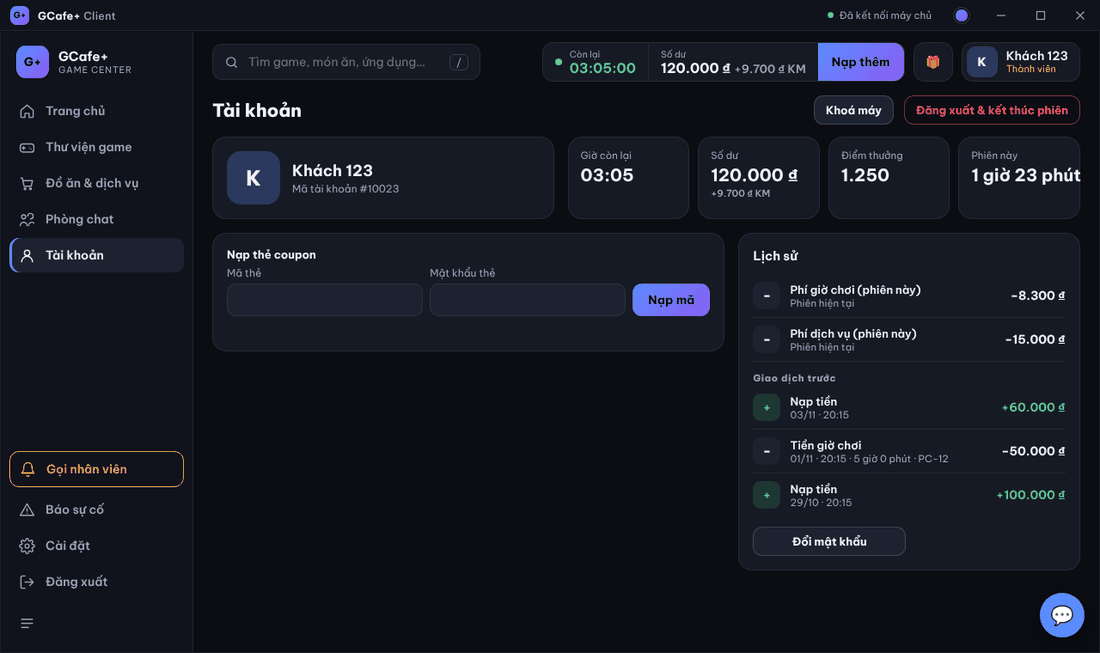
Balance and history
- Four boxes at the top: Giờ còn lại (Time left, or Đã dùng), Số dư (Balance), Điểm thưởng (Reward points), Phiên này (This session). Hover the balance to see real money, bonus and debt.
- Lịch sử (History): time and service fees for the current session, orders, redeemed coupons.
- Giao dịch trước (Earlier transactions): top-ups, play time, services, transfers… from past sessions (members only).
Change password
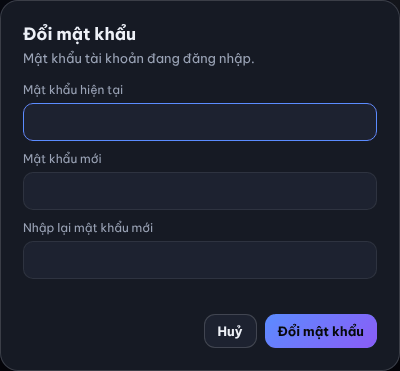
- Click Đổi mật khẩu (Change password) under History.
- Enter Mật khẩu hiện tại, Mật khẩu mới, Nhập lại mật khẩu mới (current, new, repeat).
- Click Đổi mật khẩu and wait for the result.
Log out and end the session
- Click Đăng xuất & kết thúc phiên (Log out & end session), or Đăng xuất in the left menu.
- Click Đăng xuất in the confirmation box.
Result: the session ends and the PC returns to the lock screen.
⚠️ Note: Guests cannot log out themselves — ask the counter to check out. Change password is for members only.
Common errors
Message / symptom | Cause | What to do |
|---|---|---|
Tài khoản khách không tự đăng xuất được — vui lòng báo quầy. (guests cannot log out here) | The PC runs a guest session. | Ask the counter to check out and end the session. |
Chưa lấy được lịch sử từ máy chủ (could not load history) | The server did not answer or the connection dropped. | Reopen the Account page in a few minutes. |
Khách vãng lai / thẻ: chỉ hiện giao dịch của phiên này (guest / card: this session only) | Guest and coupon accounts keep no past transactions. | Normal, nothing to do. |