Find and launch games and installed apps
The café game list comes from GCafe Update (CafeServer). Customers pick games on Home or in the Game library; apps installed on the PC are in the Apps box.
Find a game
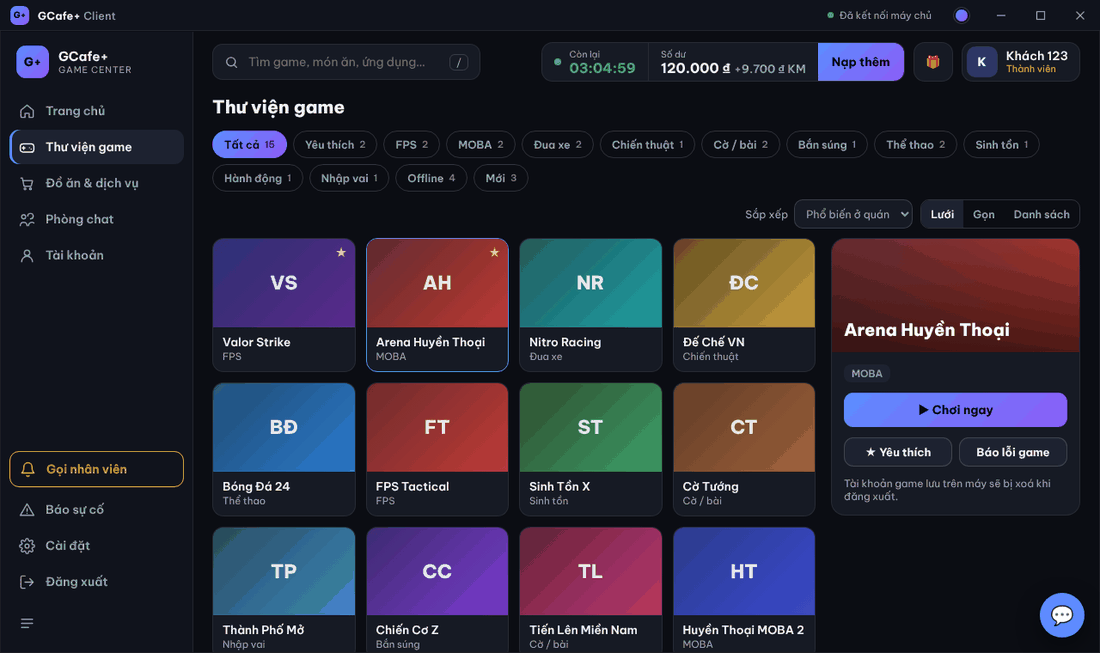
- Click Thư viện game (or Xem tất cả … game — see all games — on Home).
- Filter by genre, Yêu thích (Favorites), Offline, Mới (New); or type the name in search.
- Choose Sắp xếp (Sort): Phổ biến ở quán (Popular here), Mới cập nhật (Recently updated), Tên A–Z; change view Lưới / Gọn / Danh sách (Grid / Compact / List).
Launch a game
- Click a game once to see its details on the right.
- Click ▶ Chơi ngay (Play now), click the game again, or press Enter.
- The Client App checks files and updates, then starts the game.
A running game shows ▶ on its tile. Games that need an update download first, see Download and update games on launch.
Favorites and reporting a game
- ☆ Yêu thích (Favorite): mark a game for quick filtering. Favorites are stored on this PC.
- Báo lỗi game (Report game issue): sends Báo lỗi game: … to the counter.
Apps installed on the PC
The Ứng dụng (Apps) box on Home lists programs installed on the PC (browser, Discord, Zalo…). Hover to see the name, click to open.
Common errors
Message / symptom | Cause | What to do |
|---|---|---|
Không có game phù hợp. (no matching games) | Filter / search does not match, or the list has not arrived. | Click Tất cả (All), clear search. Still empty: ask the counter to check GCafe Update. |
Game does not open, ⚠ with a reason | Game files damaged or missing. | Launch again; use Cập nhật lại on the download screen or Báo lỗi game. |