Two ways to use Portal: full or with legacy
You can use GCafe Portal in two ways: GCafe Portal handles all billing right in Portal, or keep GCafe Billing (bản cũ) (legacy) billing as before and use Portal for chat, virtual machines, reports and ads.
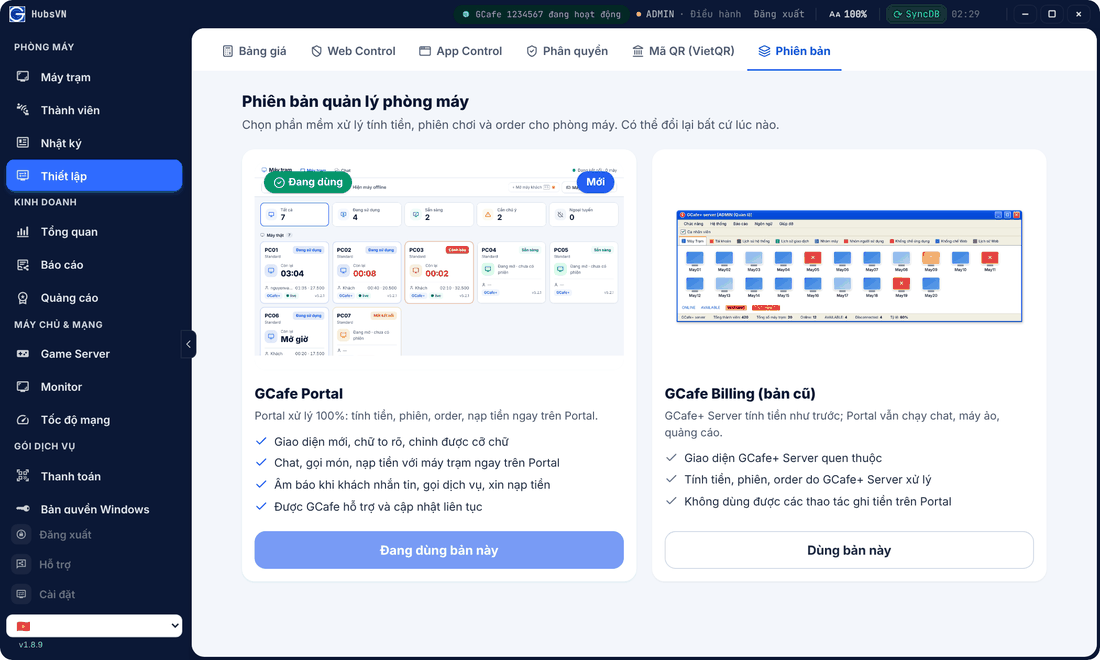
Comparing the two
GCafe Portal (new) | GCafe Billing (legacy) | |
|---|---|---|
Billing, sessions, orders, top-ups | Done in Portal | Done in GCafe+ Server |
Chat, orders, top-up requests from clients | Yes, with sound alerts | Chat can be read and answered |
Virtual machines, ads, reports, logs | Yes | Yes |
Interface | New, large text, adjustable font size | Familiar GCafe+ Server |
How to tell you are on legacy
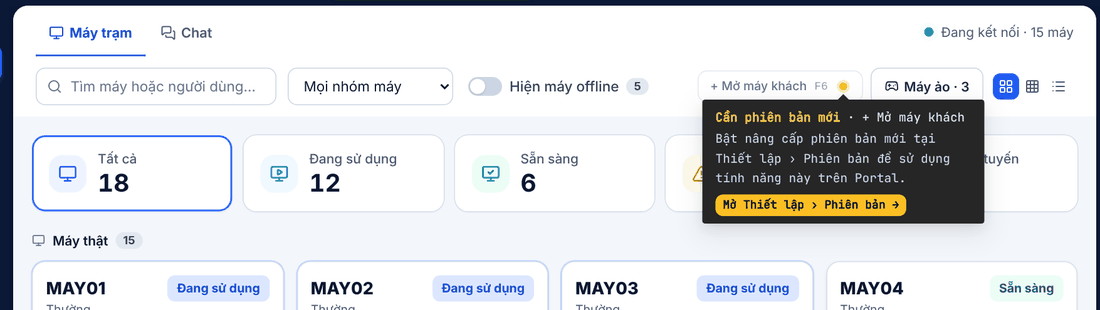
With legacy GCafe Billing, Portal buttons that write money (open guest PC, check out, top up, collect orders…) show a yellow dot. Hover it to see Cần phiên bản mới (Needs the new version).
Switching
- Open Thiết lập (Setup) › Phiên bản (Version).
- Click Dùng bản này (Use this version) on the one you want.
- Answer the short feedback (rating, reason), click Xác nhận chuyển (Confirm).
Result: Portal shows Đã chuyển phiên bản (Version switched). You can switch back at any time.
⚠️ Note: Only Manager accounts can switch. Clients may disconnect for a few seconds, so switch when the shop is quiet.
💡 Tip: New to Portal? Run alongside legacy for a few days so staff get used to it, then switch to full GCafe Portal.