Order food and services from the client PC
Customers order food, drinks and services from the client PC. The order goes straight to the counter with the payment method and a note.
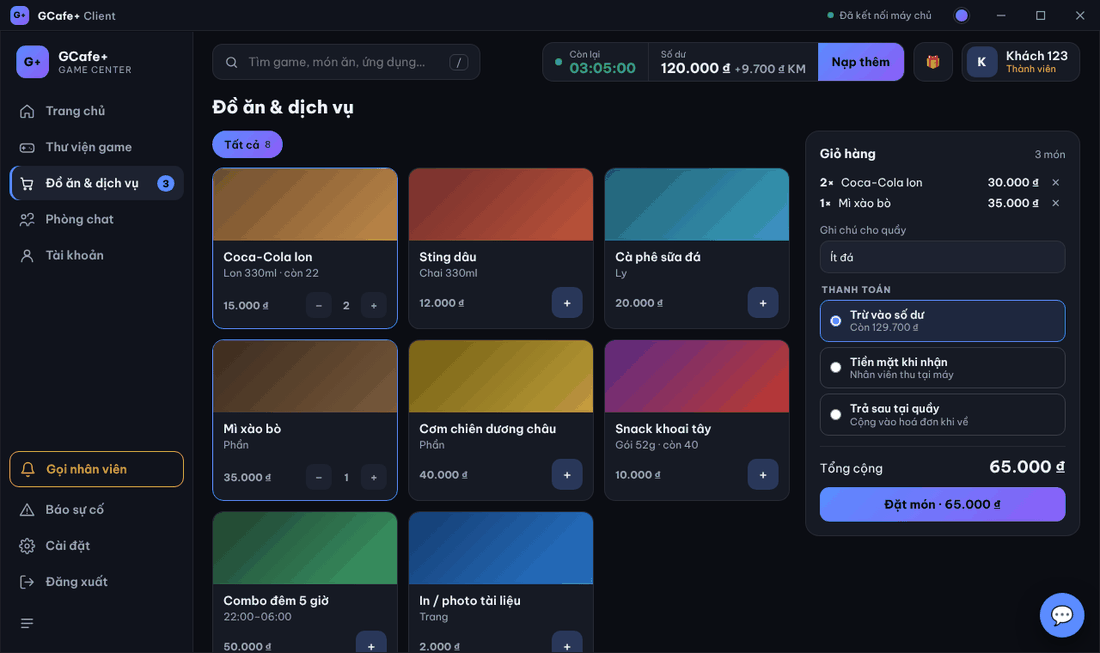
Place an order
- Click Đồ ăn & dịch vụ (or + in the Đặt nhanh — quick order — card on Home).
- Click + on an item; use + / − to change quantity, ✕ to remove it.
- Add a Ghi chú cho quầy (note for the counter) if needed (e.g. less ice, no onion).
- Choose a method under THANH TOÁN (Payment).
- Click Đặt món · … (Order).
Result: an Đã gửi đơn (order sent) notice and Đơn đã gửi quầy lúc … at the top. The counter receives it in GCafe Portal / GCafe Billing and brings it to the PC.
Payment methods
Method | Who sees it | Meaning |
|---|---|---|
Trừ vào số dư (Pay from balance) | Members with balance | Charged to the account. |
Tiền mặt khi nhận (Cash on delivery) | Everyone | Staff collect cash at the PC. |
Trả sau tại quầy (Pay later at counter) | Members | Added to the bill, paid when leaving. |
Tính vào phiên chơi (Add to this session) | Guests | Paid with play time at the end. |
Stock-tracked items show còn … (… left). Menu, prices and stock are set by the café on the server.
Common errors
Message / symptom | Cause | What to do |
|---|---|---|
Số dư không đủ (còn …) — chọn hình thức khác (not enough balance) | Order total exceeds the balance. | Choose Cash / Pay later, or top up. |
Chưa kết nối máy chủ, thử lại sau. (not connected to server) | The PC lost the server connection. | Wait for reconnection, or call staff. |
Tài khoản quản trị không đặt món (admin account cannot order) | Signed in with the client PC admin account. | Use a customer / member account. |
Quán chưa có dịch vụ nào đang bán. (no services on sale) | The café has no items on sale. | The owner adds items on the server. |
Đơn đã gửi nhưng tin thanh toán chưa gửi được — nhắn quầy giúp (order sent, payment message failed) | The order arrived but the payment-method message failed. | Tell the counter the payment method in Chat rooms. |