What is GCafe Portal?
GCafe Portal runs alongside GCafe Billing on the server: revenue, KPIs, the tax book, ads and more shop admin tools.
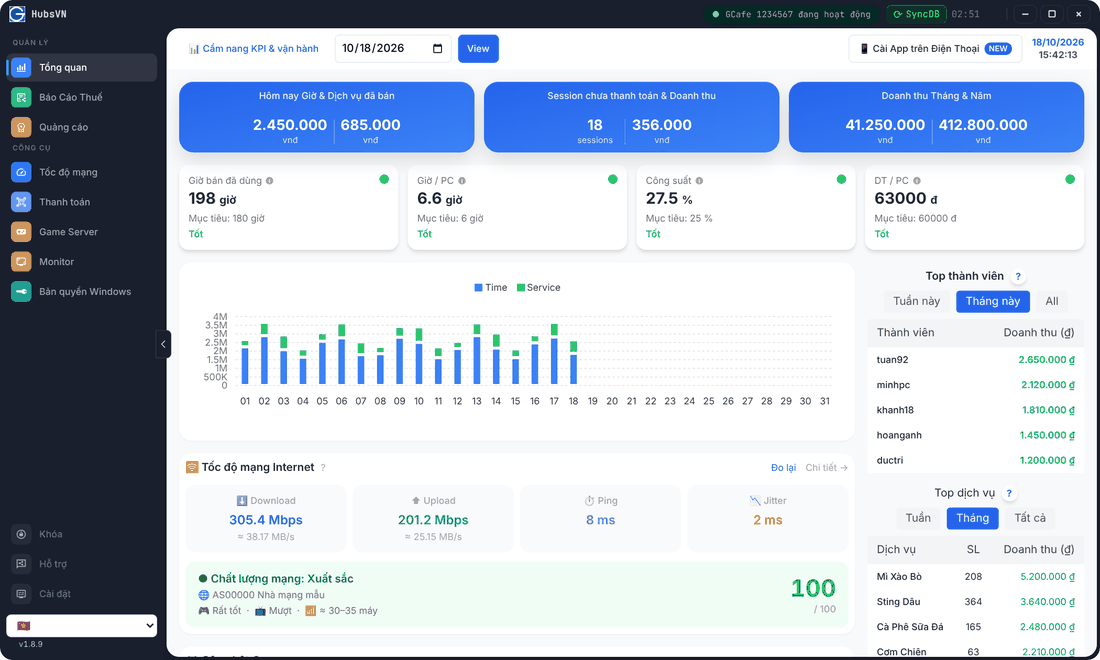
Overview: today’s revenue, operating KPIs, daily chart, top members, top services and Internet speed.
What GCafe Portal does
- Tổng quan (Overview): play-time and service revenue, unpaid sessions, month / year revenue, KPIs against targets.
- Báo Cáo Thuế (Tax report): the S1a-HKD revenue book, exported to Excel.
- Quảng cáo (Ads): GameMenu banners, client wallpapers and a lucky wheel for customers.
- Tốc độ mạng (Network speed): measure and rate the shop’s Internet line.
- Thanh toán (Payment): renew GCafe Update with a QR code, see renewal history.
- Game Server: open the GCafe Update (CafeServer) console inside Portal.
- Monitor: watch server and client hardware (CPU, RAM, disks, temperature).
- Bản quyền Windows (Windows licensing): a license pool, assigned and activated per client PC.
- Remote access: open Portal over the Internet and install it as an app on your phone.
Where does Portal get its data?
Portal reads GCafe Billing data (transactions, sessions, accounts) on the same server and syncs it every few minutes. Portal must therefore be installed on the server running GCafe Billing, and the shop needs a CafeID.
Terms used in this guide
Term | Meaning |
|---|---|
CafeID | The shop’s 7-digit ID, used for renewal, sync and remote access. |
GCafe+ Server | The GCafe Billing program on the server. |
GameMenu | The game launcher on client PCs; banners and the lucky wheel appear here. |
SyncDB | Sync GCafe Billing data into Portal. |
Unpaid session | A play session still open, not yet settled. |
Where to start?
- Open Portal and verify your CafeID.
- Get to know the Portal interface.
- Check the Overview screen daily.
- Turn on the app password, then remote access on your phone.