Control client PCs from the counter
The Máy (Machine) tab in the detail panel sends commands to a client PC without walking over: shut down, restart, close apps, adjust volume.
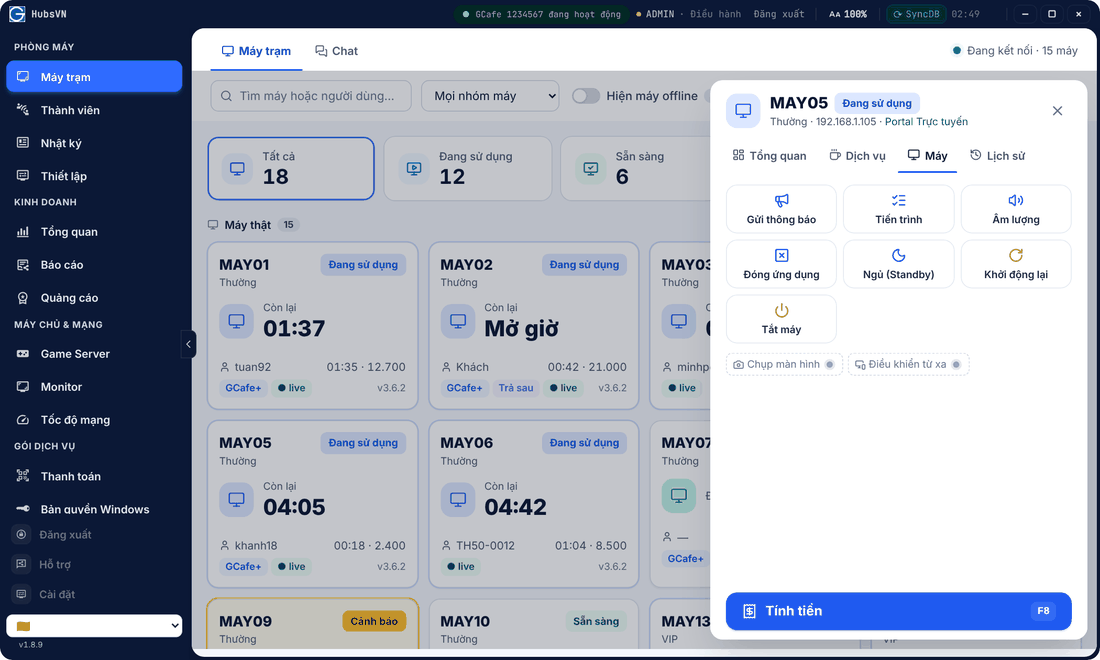
Available commands
Button | Effect |
|---|---|
Gửi thông báo (Send notice) | Show a message on the client screen. |
Tiến trình (Processes) | See running programs and close a frozen one. |
Âm lượng (Volume) | Change or mute client volume. |
Đóng ứng dụng (Close apps) | Close all open applications. |
Ngủ (Standby), Khởi động lại, Tắt máy | Sleep, restart, shut down. |
How to
- On Máy trạm, click the PC.
- Open the Máy tab, click a command and confirm.
⚠️ Note: Shutting down or restarting while a guest plays loses their unsaved work. Warn them first with Gửi thông báo or Chat.
Greyed-out Chụp màn hình (Screenshot) and Điều khiển từ xa (Remote control) are coming soon.
Common errors
Message / symptom | Cause | What to do |
|---|---|---|
Command sent but the PC does not react | The PC is offline or disconnected. | Turn on Hiện máy offline to check; check the PC network. |