Café channel: chat with the whole café
The Café channel is a group chat shared by every PC in the café and run by the counter: find teammates and read counter announcements.
Before you start
The café uses GCafe Portal with Chat turned on (see Chat with the counter and other client PCs).
Message the whole café
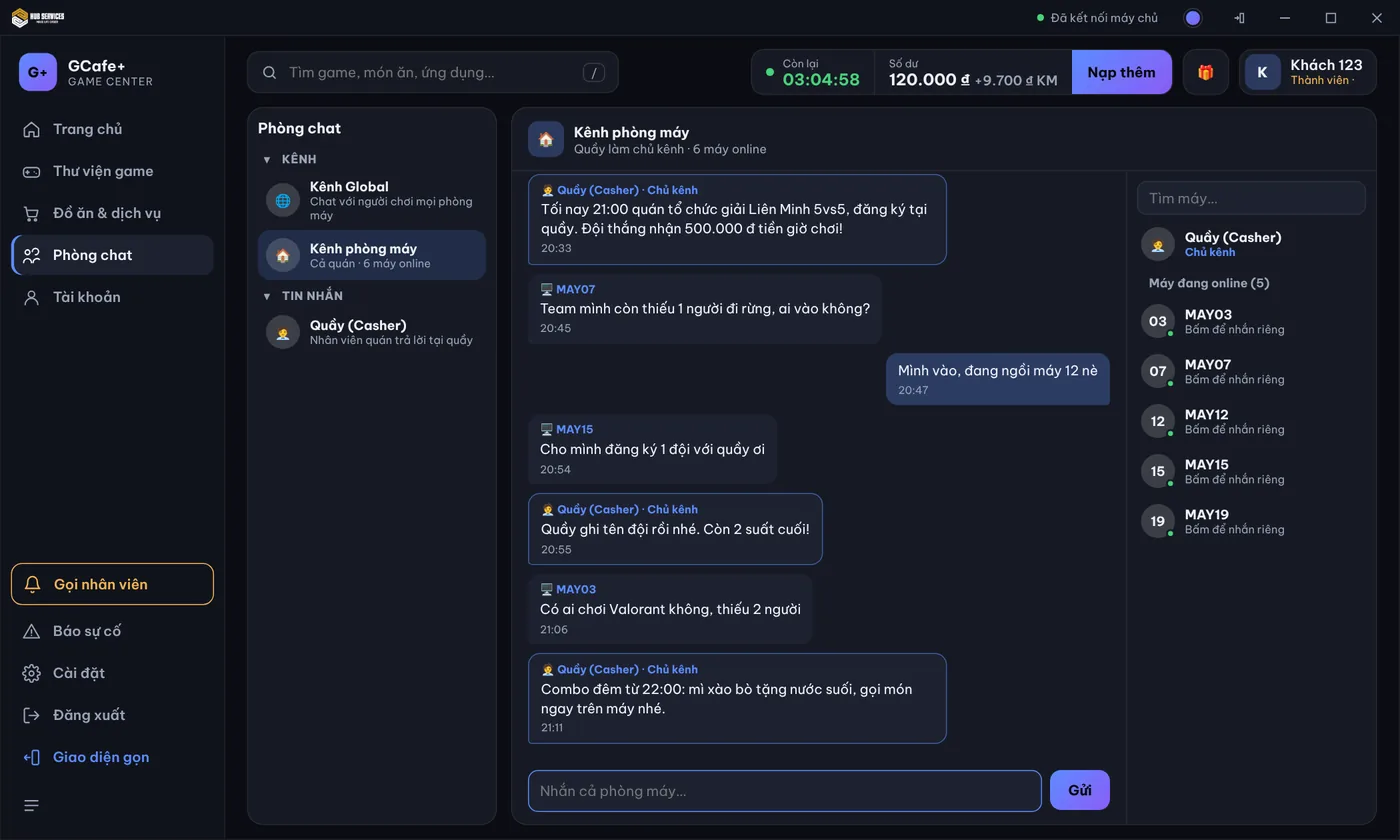
- Click Phòng chat › Kênh (Channels) › Kênh phòng máy.
- Type in Nhắn cả phòng máy… (Message the whole café) and click Gửi or press Enter (up to 500 characters).
Counter messages carry the Chủ kênh (Channel owner) label. The right column lists Máy đang online (PCs online): type in Tìm máy… and click a PC to message it privately.
⚠️ Note: The counter can remove inappropriate messages and temporarily mute a spamming PC. A muted PC can still read the channel.
Common errors
Message / symptom | Cause | What to do |
|---|---|---|
Quầy đang để kênh chỉ Quầy được nhắn. | The counter turned on Chỉ Quầy nhắn (Counter only) to use the channel for announcements. | Read the announcements; to ask the counter, message Quầy. |
Quầy đã tạm khoá bạn nhắn trong kênh này đến … | The counter muted this PC for a while. | Wait until the time shown or message the counter privately. |
Chưa có máy nào khác online | No other PC has GameMenu open. | Nothing to do. |