Call staff and report a PC problem
When the PC lags or a headset breaks, customers click Call staff or Report a problem; the counter is alerted at once in GCafe Portal.
Call staff
Click Gọi nhân viên (Call staff) in the left menu (or right-click the G+ tray icon › Gọi nhân viên). The counter receives 🔔 Gọi nhân viên tới máy.
Report a problem
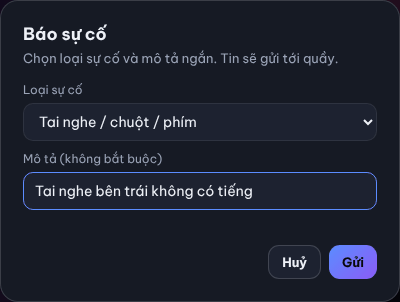
- Click Báo sự cố in the left menu (or ⚠ Báo sự cố in the Cần hỗ trợ? card).
- Choose Loại sự cố (Problem type): Máy lag / treo, Mạng chậm / mất mạng, Tai nghe / chuột / phím, Màn hình, Game lỗi, Khác (PC lag, network, headset/mouse/keyboard, monitor, game error, other).
- Add a short Mô tả (Description, optional).
- Click Gửi (Send).
Result: the counter receives ⚠ Báo sự cố: … in this PC's chat.
Notices from the counter
The counter can send notices or commands to the PC (shut down, restart, close apps…). The PC shows 📢 … or Quầy yêu cầu: … (Counter request) before acting. See Control client PCs from the counter.
💡 Tip: Call staff and Report a problem still work when the counter has turned off chat for the PC.