Download and update games on launch
On launch the Client App compares the game with GCafe Update: if it differs, only changed parts download first; if it matches, the game starts.
The download screen
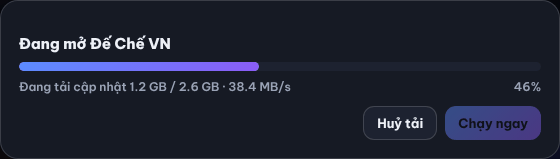
Steps shown in order: Đang lấy danh sách file từ máy chủ… (getting file list) ⇒ Đang kiểm tra file trên máy… % (checking local files) ⇒ Đang tải cập nhật … / … · …/s (downloading) ⇒ Đang kiểm tra lại file vừa tải… (verifying).
- Click Huỷ tải (Cancel) to stop. Next launch resumes the remaining part.
- When done, Chạy ngay (Play now) becomes active and counts down, then starts the game.
Repair a broken game
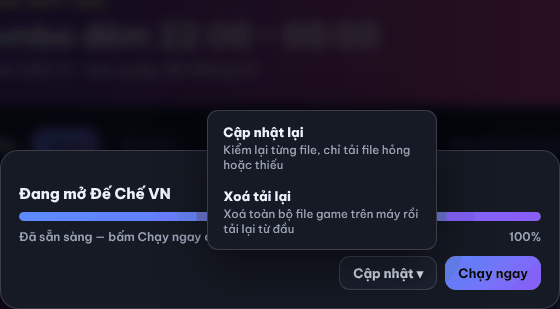
When the bar reaches 100%, click Cập nhật ▾ (Update) and choose:
Option | When to use |
|---|---|
Cập nhật lại (Re-check files) | The game reports missing / broken files: re-checks every file, downloads only broken or missing ones. |
Xoá tải lại (Delete & re-download) | Re-check did not help: deletes all game files on the PC and downloads again (slower). |
⚠️ Note: If the game server cannot be reached, the Client App still lets you play the version already on the PC.
Common errors
Message / symptom | Cause | What to do |
|---|---|---|
Không cập nhật được game: … (could not update the game) | No connection to the game server, disk full, or files locked. | Click Chạy bản đang có (Run current version) to play, or Đóng (Close) and retry; tell the counter if it repeats. |
Đã huỷ tải — lần sau tải tiếp phần còn lại (download cancelled, resumes next time) | You clicked Cancel. | Launch the game again to continue. |
Very slow download | Busy LAN or the game server is serving many PCs. | Wait or tell the counter; see CafeServer download errors. |