Request a top-up and redeem coupons
Customers add money without walking to the counter: send a top-up request for the counter to confirm, or redeem a coupon (card code + card password) themselves.
Send a top-up request to the counter
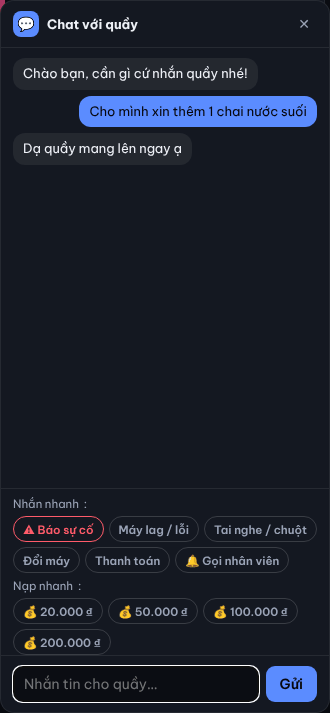
- Open Phòng chat › Quầy (Counter), or the 💬 chat panel in the bottom-right.
- On the Nạp nhanh (Quick top-up) row, click an amount (e.g. 💰 50.000 đ).
- Wait for the counter to confirm and pay the staff member in cash.
Result: Đã gửi yêu cầu nạp … — chờ quầy xác nhận (request sent, waiting for counter); once topped up, Đã nạp … appears and the balance rises. If refused: Quầy từ chối yêu cầu nạp.
Redeem a coupon
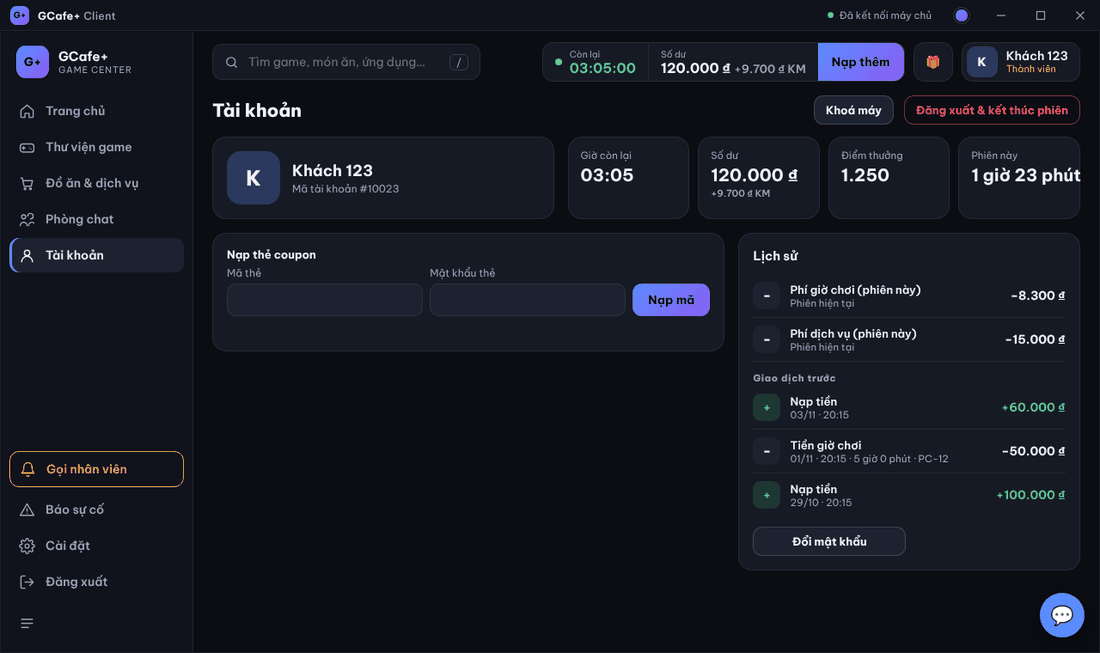
- Click Nạp thêm (Top up) in the top bar (or open Tài khoản).
- Under Nạp thẻ coupon, enter Mã thẻ (Card code) and Mật khẩu thẻ (Card password).
- Click Nạp mã (Redeem).
Result: Đã gửi yêu cầu nạp, đang chờ máy chủ…, then the result; on success the history shows Nạp coupon thành công.
⚠️ Note: Top-up is shown only for accounts with a balance (members, coupons, prepaid guests). Pay-per-hour guests pay at the counter at the end.
Common errors
Message / symptom | Cause | What to do |
|---|---|---|
Vui lòng nhập mã thẻ và mật khẩu thẻ. (enter card code and password) | One field is empty. | Fill both, then click Nạp mã. |
Nạp thất bại: … (top-up failed) | Wrong or used code, or the server refused. | Check the code; ask the counter. |
Quick top-up only sends a chat message | Direct top-up is not enabled in GCafe Portal. | The counter still reads it and tops up manually on the server. |