How CafeServer downloads and serves games
A short explanation of how CafeServer works, to help you read the numbers on the Console and pick the right settings.
1. Knowing which games need updates
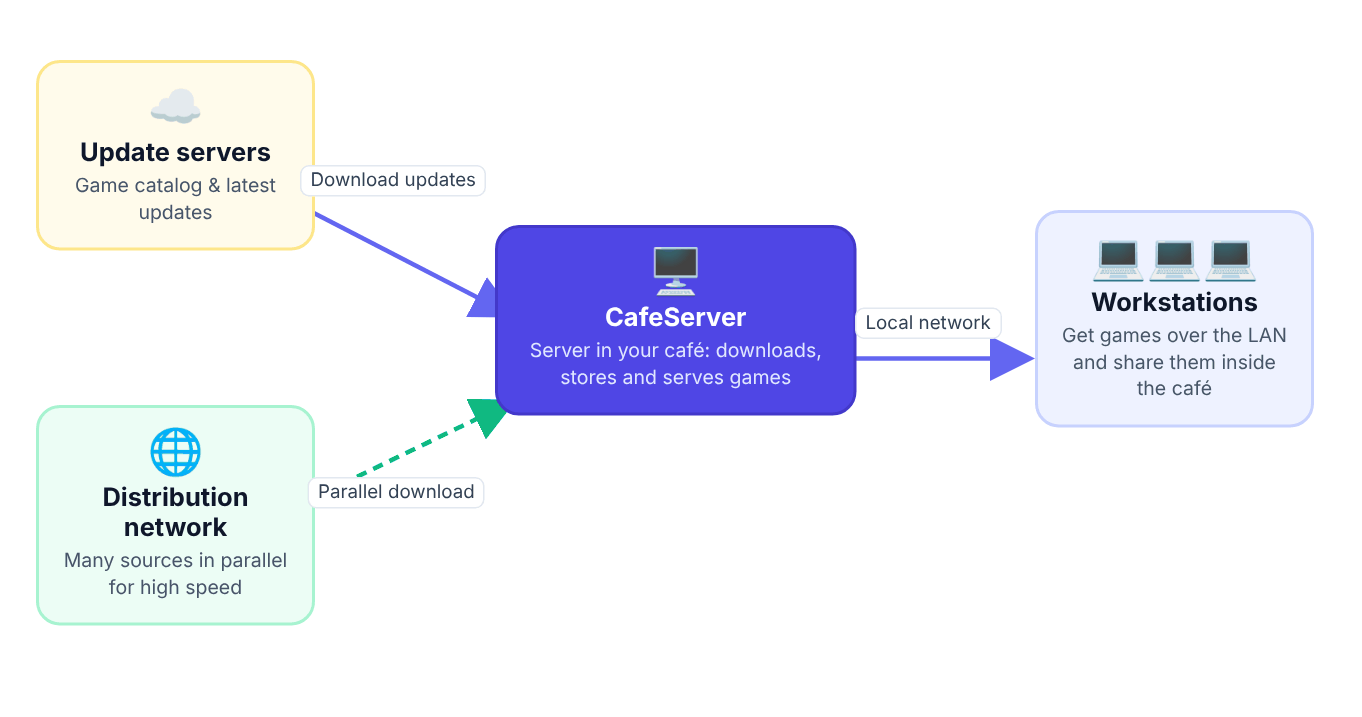
CafeServer regularly fetches the latest game catalog. Games in your café that are older than the catalog and set to Auto join the update queue. Games set to Manual only show "Update available" and wait for you.
2. Downloading only what changed
Each game is split into many small pieces. When updating, CafeServer compares them and downloads only the pieces that changed — so a few-hundred-MB update never means re-downloading a 50 GB game.
- Update (Quick): downloads the changes from the known list — fast.
- Full Update: re-checks every file and fills in anything missing or damaged — slower but thorough.
3. Several sources at once
To download fast, CafeServer pulls game pieces in parallel from several of the GCafe Update system's download sources. CafeServer's Internet traffic always stays within the Download / Upload limit in Settings, so you stay in control and your players are not affected.
4. Serving games to workstations
Workstations get games directly from your server over the LAN. Each group only sees its assigned games, running from the local drive or a virtual drive as configured.
Workstations running GCafe+ Client App also share downloaded games with other workstations in the café, so many PCs downloading the same game stay fast. Follow it on the Station downloads page.
5. Your own games & external sources
Games you add yourself need an index (Generate Index) so workstations can download them over the LAN. Games downloaded with BitTorrent get their index automatically when the download finishes.