What is GCafe+ Client?
GCafe+ Client is the client PC software for internet cafés: a lock screen to sign in and the Client App to play, order food and chat with the counter.
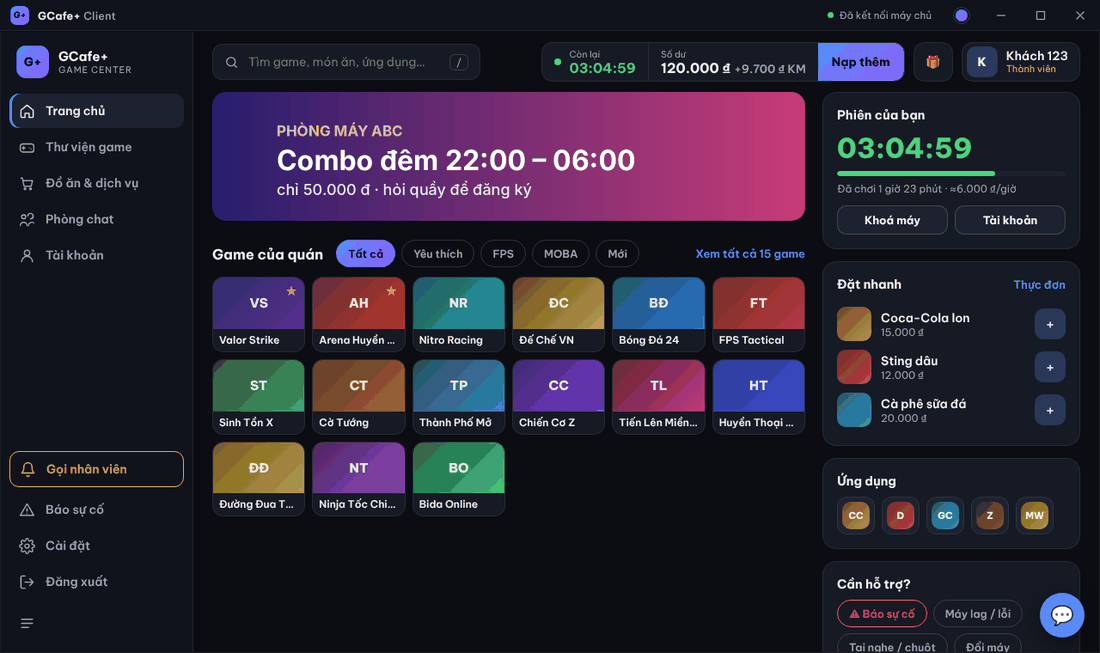
What GCafe+ Client includes
Part | What customers see | Used for |
|---|---|---|
Lock screen (Locker) | A clock, the café background, Tài khoản (Account) / Mật khẩu (Password) fields. | Locks the PC when there is no session; customers sign in to start playing. |
Client App | The GCafe+ Client window after unlocking, with a G+ tray icon. | Launch games, order food, top up, chat, call staff, view history. |
Installer and updater | No window of its own. | Installs, removes and auto-updates GCafe+ Client on the PC. |
GCafe+ Client works with the café server: GCafe Billing or GCafe Portal for billing, chat and orders; GCafe Update (CafeServer) for the game list and game downloads.
Terms used in this guide
Term | Meaning |
|---|---|
Client PC | A customer PC with GCafe+ Client installed. |
Server | The counter PC running GCafe Billing / GCafe Portal. |
Counter | The cashier staff who answer chat, take orders and top up accounts. |
Session | The time from when a PC is opened (customer signs in or the counter opens it) until log out / time runs out. |
Member | A customer with their own account, balance and transaction history. |
Guest | A customer the counter opens a PC for, without a personal account. |
Lock screen | The full-screen cover shown when there is no session or during a temporary lock. |
Client App | The customer app after unlocking (formerly GameMenu). |
Where to start
- Technicians: install GCafe+ Client, then enter the server IP on first run.
- Café owners: read how GCafe+ Client works and the GCafe Portal settings.
- Customers / staff: sign in on the lock screen, then get to know the Client App.
- Problems: see Common client PC errors.