Lock the PC temporarily when stepping away
A customer who leaves the PC for a moment but does not want to end the session can lock it with a temporary password. The session and the clock keep running.
Lock the PC
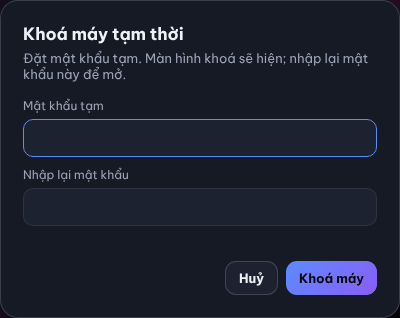
- Click Khoá máy (Lock PC) in the Phiên của bạn card on Home or on the Tài khoản page.
- Type Mật khẩu tạm (Temporary password) and Nhập lại mật khẩu (Repeat password).
- Click Khoá máy.
Result: the Màn hình đã khoá (Screen locked) screen covers the PC.
Unlock
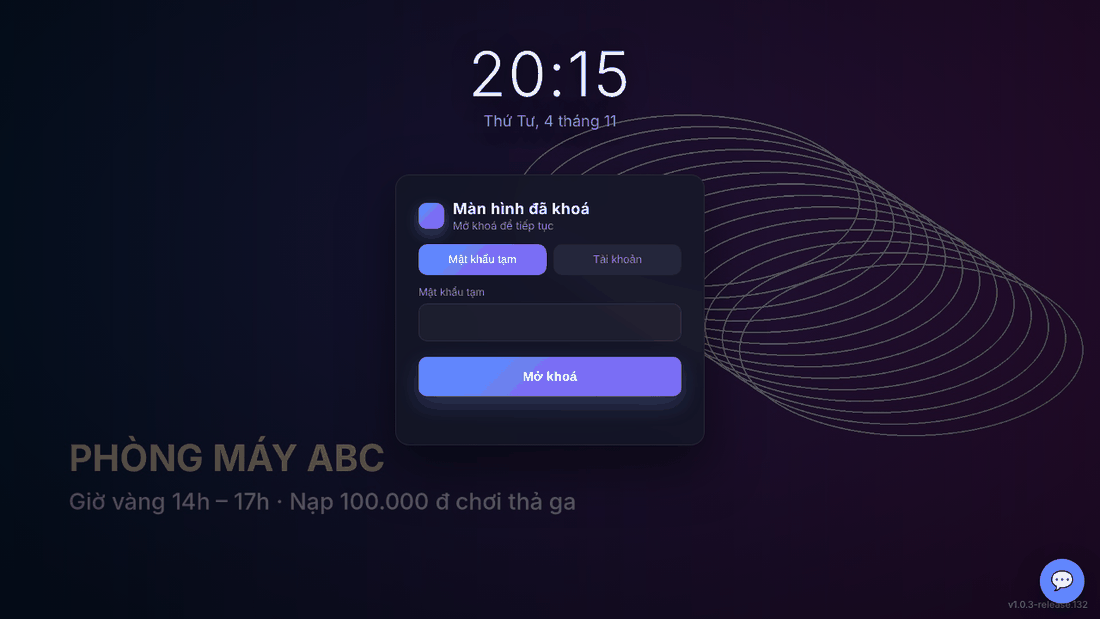
- On the Mật khẩu tạm tab, type the password you set.
- Click Mở khoá (Unlock).
There are two ways to unlock: the temporary password set when locking, or the account currently playing on the PC — choose the Tài khoản (Account) tab, enter that session's account and password and click Mở khoá. If both are forgotten, ask the counter.
⚠️ Note: Time is still charged during a temporary lock. Log out to stop billing.
Common errors
Message / symptom | Cause | What to do |
|---|---|---|
Hai mật khẩu không khớp. (passwords do not match) | The two fields differ. | Type the same password twice. |
Dịch vụ máy trạm chưa chạy, thử lại sau. (station service not running) | The Client App lost the station service. | Wait a few seconds and retry; tell the counter if it persists. |
Sai mật khẩu / tài khoản (wrong password / account) | Wrong temporary password or account. | Retype; ask the counter if forgotten. |