Set the server IP on first run and change server
The client PC needs the café server IP to sign in, bill and chat. If it was not entered during install, the lock screen asks on first run.
Enter the server IP on the lock screen
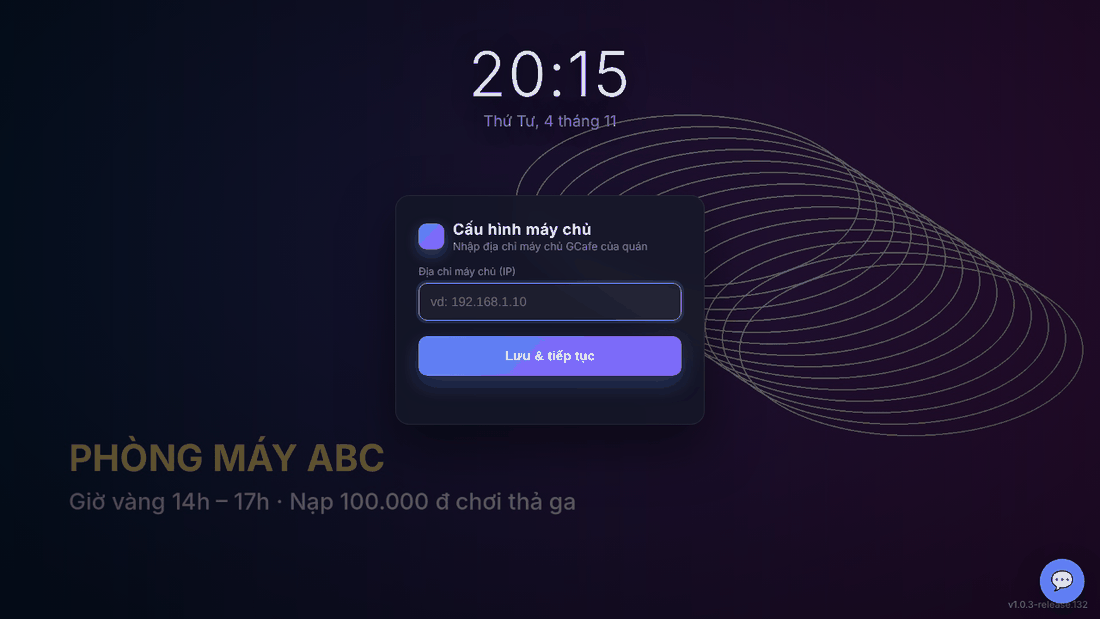
- In Cấu hình máy chủ (Server configuration), type the café GCafe server IP into Địa chỉ máy chủ (IP).
- Click Lưu & tiếp tục (Save & continue).
Result: the sign-in box appears; the status line at the bottom shows the PC has reached the server.
Change the server after install
When the server IP changes, sign in on the client PC with the client PC admin account, then:
- Open Client App › Cài đặt (Settings). Server settings are only shown to the admin account.
- Under Máy chủ GCafe Portal / GCafe Billing, type the new IP in IP / tên máy chủ and click Lưu & kiểm tra (Save & test).
- Wait for Dịch vụ máy trạm đã đổi sang … và đang nối lại (station service switched and is reconnecting).
Game server (GCafe Update)
Also in the admin Cài đặt, Máy chủ Game (CafeServer) sets how the game server is found:
- Tự động (Auto): finds CafeServer on the LAN (recommended).
- Thủ công (Manual): type the game server IP when it is not found automatically.
- Thư mục tải game về máy này (Game download folder): empty = same path as on CafeServer; if the PC lacks that drive an existing drive is used. Enter a drive (
D:) or folder (D:\Games) to change it.
Click Lưu & kiểm tra; Quét lại (Rescan) reloads the game list now.
⚠️ Note: The client PC admin account is managed by the café owner in GCafe Portal. Never give it to customers.
Common errors
Message / symptom | Cause | What to do |
|---|---|---|
Nhập địa chỉ máy chủ (enter the server address) | Saved with an empty IP. | Type the server IP and try again. |
Dịch vụ máy trạm không đổi được địa chỉ máy chủ (station service could not change the server address) | The station service is not running or rejected the address. | Restart the client PC, check the IP and try again. |
IP entered but still Chưa kết nối máy chủ (not connected) | Wrong IP, server off, or server firewall blocking. | Check GCafe Billing / GCafe Portal is running, ping the server IP from the client PC. |