Thai interface and the Buddhist calendar (พ.ศ.)
Cafés in Thailand can run GCafe Portal in Thai and show years in the Buddhist calendar (พ.ศ.). Only the display changes; data stays the same.
พ.ศ. = Gregorian year + 543; time fees and reports are calculated as before.
Switch to Thai
- Portal layout: at the bottom of the left menu, pick the 🇹🇭 flag in the language box. GCafe Billing layouts: pick ไทย in the Ngôn ngữ (Language) box on the menu bar.
- The interface switches to Thai at once.
Language is a café-wide setting, stored on the Portal server and shared with client PCs (GCafe+ Client).
Show years in the Buddhist calendar
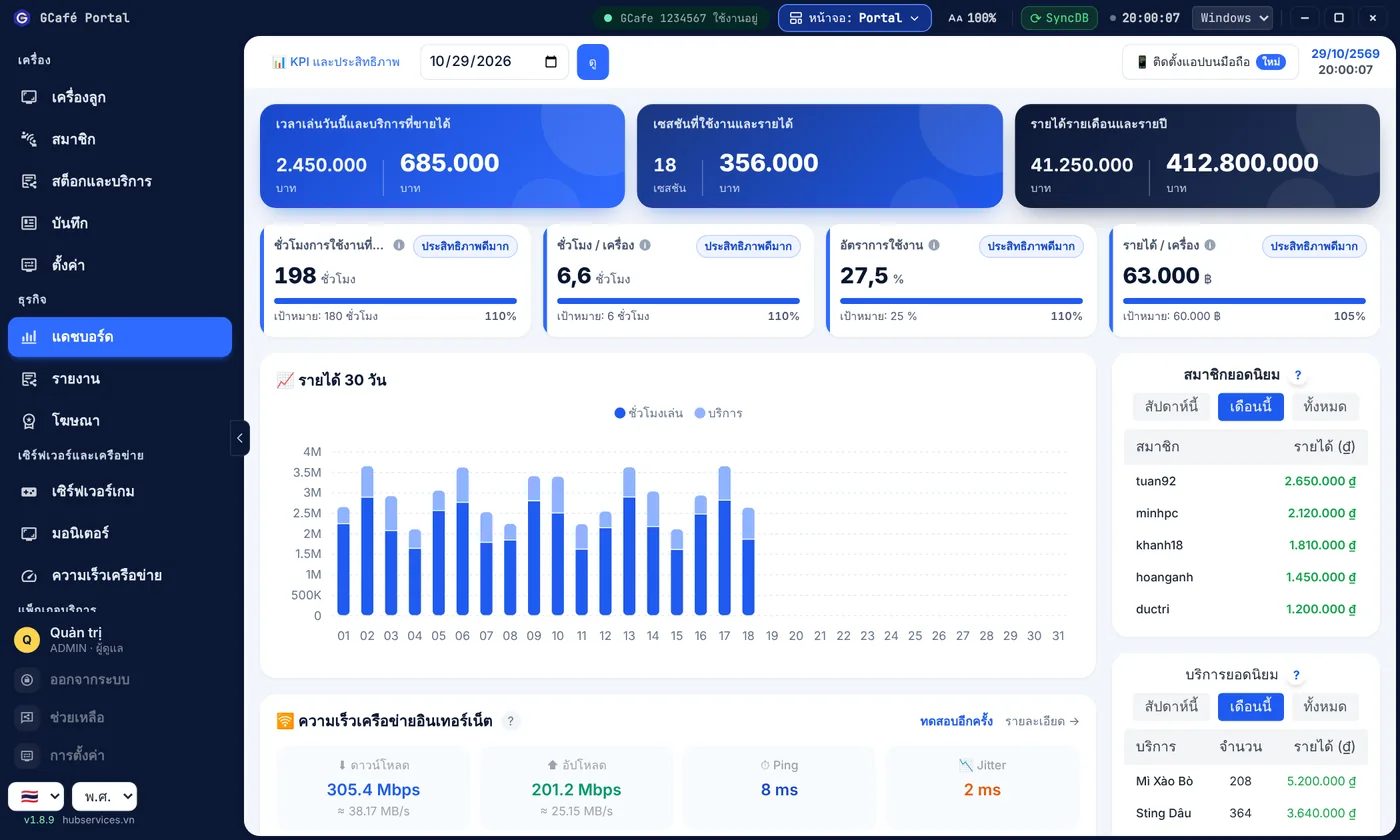
- In the Portal layout, while the interface is in Thai, a calendar box appears next to the language box.
- Pick พ.ศ. (Buddhist). Pick ค.ศ. to go back to the Gregorian calendar.
Result: 2026 shows as 2569. The calendar choice is saved per counter PC; switching to another language shows Gregorian dates again.
⚠️ Note: The calendar box is only in the Portal layout. Some tables (such as the transaction log) still show Gregorian years for now.