Food and drink promotions
In Kho & dịch vụ › Khuyến mãi you create promotions for counter sales and orders from client PCs: happy hours, buy 2 get 1, a free drink with a meal…
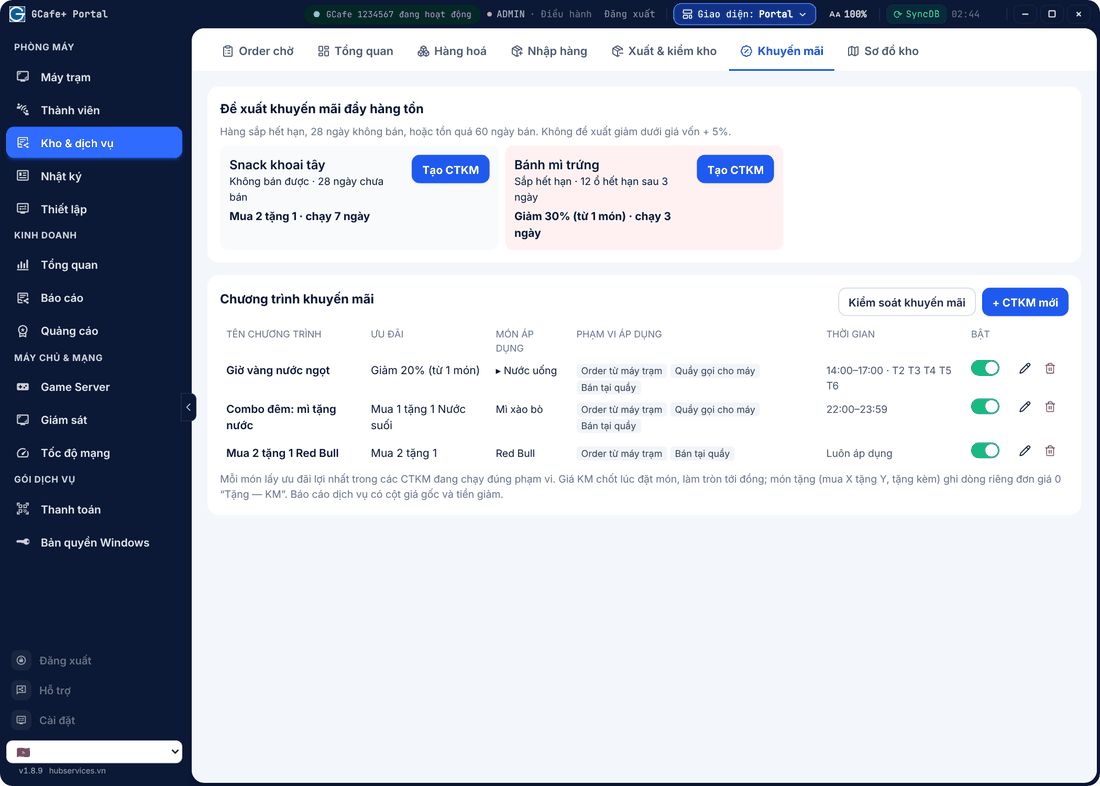
Create a promotion
- Click + CTKM mới (New promotion) and name it.
- Pick the Loại (Type) and the offer (table below).
- Áp cho (Products): Tất cả món (all), Theo danh mục (by category) or Chọn món (pick items).
- Phạm vi áp dụng (Applies to): Order từ máy trạm (ordered from PC), Quầy gọi cho máy (counter for a PC), Bán tại quầy (counter sale) — at least one.
- Timing: from / to date, from / to time, Ngày trong tuần (weekdays); leave empty for Luôn áp dụng (always).
- Save, then switch it Bật (On).
Type | Example |
|---|---|
Giảm % (Percent off) | 20% off soft drinks 14:00–17:00. |
Giảm tiền / món (Amount off) | 3,000 VND off each coffee. |
Đồng giá (Fixed price) | All snacks at 10,000 VND. |
Mua X tặng Y (Buy X get Y) | Buy 2 get 1 Red Bull. |
Tặng kèm món khác (Free gift item) | Buy 1 fried noodles, get 1 water free. |
Each item gets the best running promotion for its scope. The promo price is fixed at order time; free items are logged as a separate 0-price line and leave stock. Client PCs show promo prices on the order menu.
⚠️ Note:Tặng kèm món khác only runs when the shop bills fully in Portal — see Two ways to use Portal.
Promotions to clear risky stock
Portal finds items that are expiring, unsold for 28 days or overstocked and suggests a discount (never below cost + 5%). Click Tạo CTKM to use it.
Promo controls
Click Kiểm soát khuyến mãi (Promo controls) to set the maximum discount staff may set (50% by default) and choose the staff allowed to manage promotions. Discounts beyond the limit or below cost can only be saved by an Điều hành (Admin) account.
💡 Tip: Service reports show list price and discount so you can measure each promotion — see Reports.