Accept bank transfers with QR codes (VietQR)
Set up Mã QR chuyển khoản (VietQR) so Portal creates payment QR codes with the amount and memo filled in, and checks the transaction when a guest says they have paid.
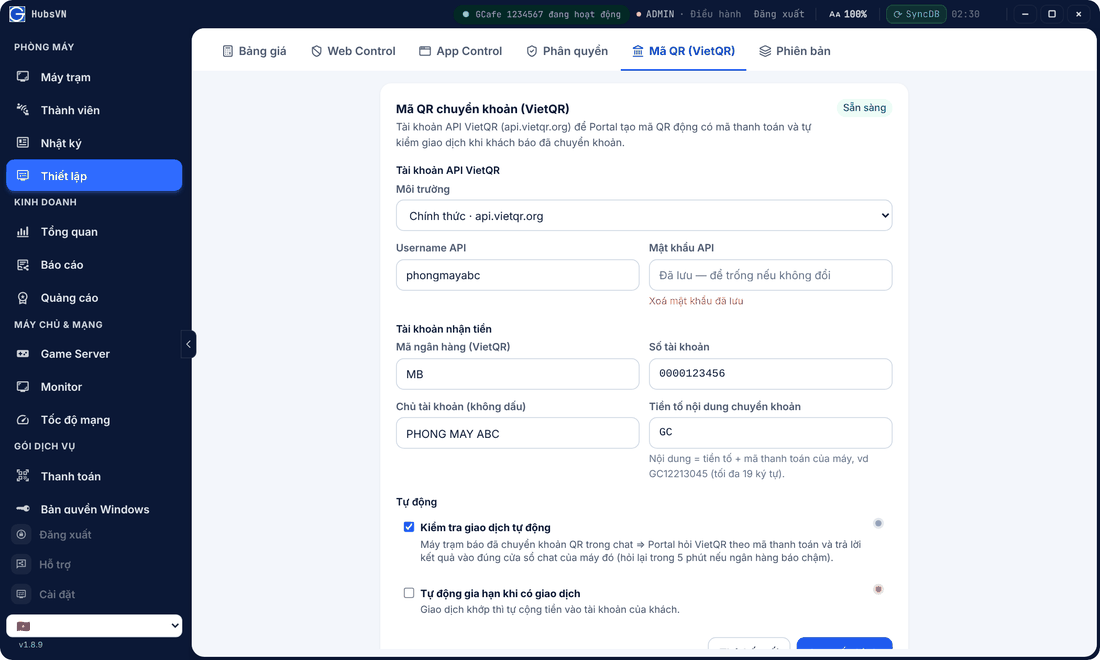
Setup
- Open Thiết lập › Mã QR (VietQR).
- Enter the shop’s VietQR API account (register at vietqr.org).
- Enter Mã ngân hàng (Bank), Số tài khoản (Account number), Chủ tài khoản (không dấu) (Account name, no accents) and Tiền tố nội dung chuyển khoản (Memo prefix).
- Save. Sẵn sàng (Ready) at the top means done.
Automation
- Kiểm tra giao dịch tự động (Auto check): when a guest scans and says “paid” in chat, Portal checks the transaction and reports.
- Tự động gia hạn khi có giao dịch (Auto credit): matching money is credited to the guest without staff action.
⚠️ Note: API credentials are entered on the server only and never shown again. To change them, enter a new password.
Common errors
Message / symptom | Cause | What to do |
|---|---|---|
Not showing Sẵn sàng | Bank details missing or API account wrong. | Check every field, re-enter the API password. |
Guest transferred but was not credited | Memo was edited or the bank is slow. | Wait a few minutes; check the memo, top up manually if needed. |