Add and manage the license pool
The Kho license (License pool) tab stores the shop’s Windows product keys, used / remaining activations and each license’s status.
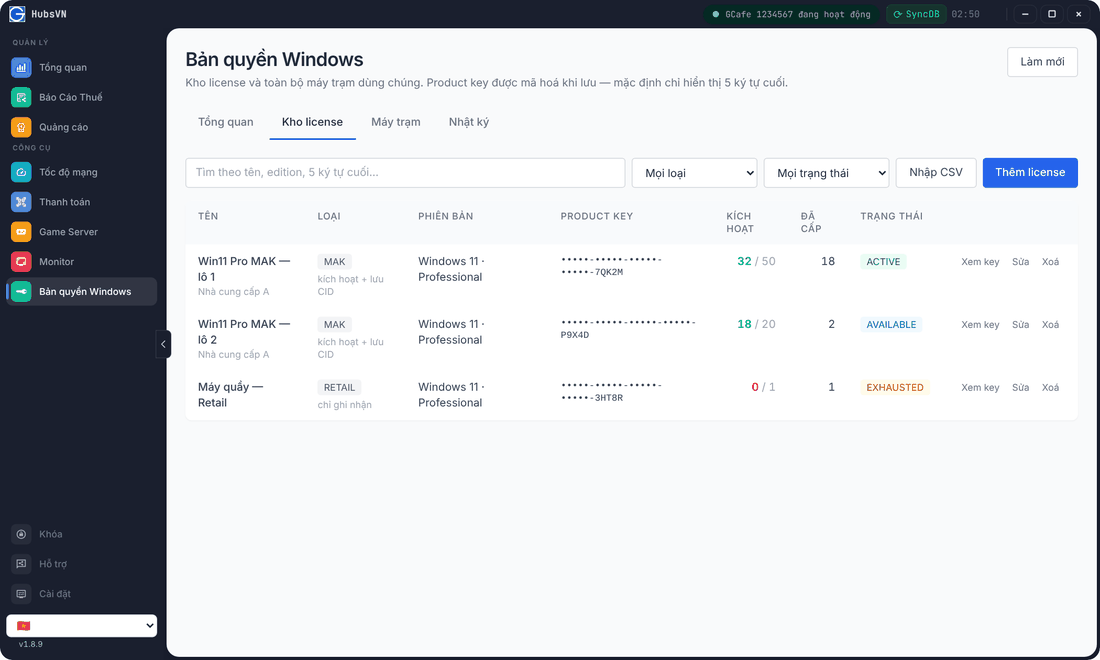
Add a license
- Click Bản quyền Windows › Kho license › Thêm license (Add license).
- Enter the Product key, choose the Loại license (type: MAK, Retail, OEM…), Windows version and edition.
- Enter the Giới hạn kích hoạt (activation limit, for MAK), vendor, invoice number, purchase date and expiry (empty for perpetual).
- Save.
Import many licenses from CSV
- Click Nhập CSV (Import CSV); download the template if needed.
- Paste the CSV content (required columns:
license_key,license_type). - Import; the result for each row is shown below.
View, edit, delete
- Xem key (View key): shows the full product key. Every view is written to the Nhật ký (Log).
- Sửa (Edit) / Xoá (Delete): change the details or remove the license.
- Kích hoạt column: activations left / limit; red when used up.
Status | Meaning |
|---|---|
AVAILABLE | Free, can be assigned. |
ACTIVE | In use by client PCs. |
EXHAUSTED | No activations left. |
EXPIRED / BLOCKED | Expired or blocked — cannot be assigned. |