CafeID & license
Every café has a CafeID and a CafePwd. CafeServer uses them to verify your license. Games update automatically only while the license is valid.
Checking the license
The top of the Console always shows the CafeID, café name, expiry date, licensed PC count and connection status:

Valid license: green box, Central "Verified", Updater "Connected".

Expired or rejected license: the box turns red with the reason.
Shown | Meaning |
|---|---|
Green box, "N days left" / expiry date | License valid, everything works. |
Red box "Expired" | The license has expired — CafeServer stops updating games automatically. Renew with your dealer. |
"Too many PCs" | You have more workstations than the license allows. Remove unused PCs or upgrade the license. |
"License N/A — waiting for Central" | CafeServer is checking the license; wait a few seconds. |
A red reason (e.g. "Wrong CafeId / password") | The license cannot be used — see License errors. |
Entering or changing the license
- Click Change at the top right.
- Enter the CafeID and CafePwd / password. To keep the current password, leave CafePwd empty.
- Click Save & connect and wait a few seconds for verification.
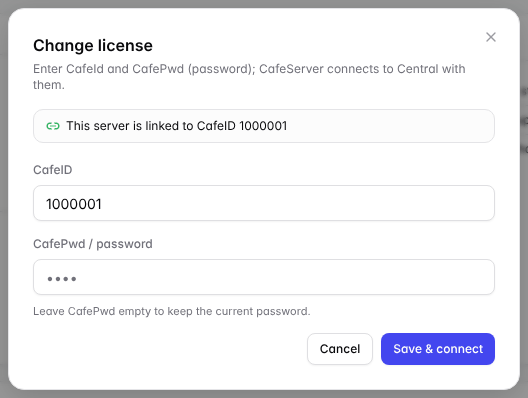
The Change license dialog. The top line shows which CafeID this server is linked to.
- Correct details: CafeServer switches to the new license and confirms.
- Wrong details, expired license or license in use elsewhere: the dialog shows the error and CafeServer keeps the old license — your café is not interrupted.
Registering a new CafeID
New café without a CafeID? When the license is not valid, the license sign-in dialog has a Register new button:
- Contact: name, phone number, email.
- Café: café name, number of PCs, address, province / city, district.
- OTP: enter the 6-digit code sent to your phone / email.
- When done, click Use this CafeID & connect. Keep the AuthKey shown on screen.
Good to know
- A CafeID can be used on only one server at a time.
- Moving a CafeID to another server: stop CafeServer on the old server first, then wait a while before signing in on the new one. Contact your dealer if it is urgent.
- Several wrong license changes in a row temporarily lock the license change feature.
- The web password (Console) and the CafePwd (license) are different. Changing CafePwd does not change the web password.