See your shop’s revenue and KPIs
The Tổng quan (Overview) screen shows how much the shop sold today, how busy the PCs are against target, who spends the most and what sells best.
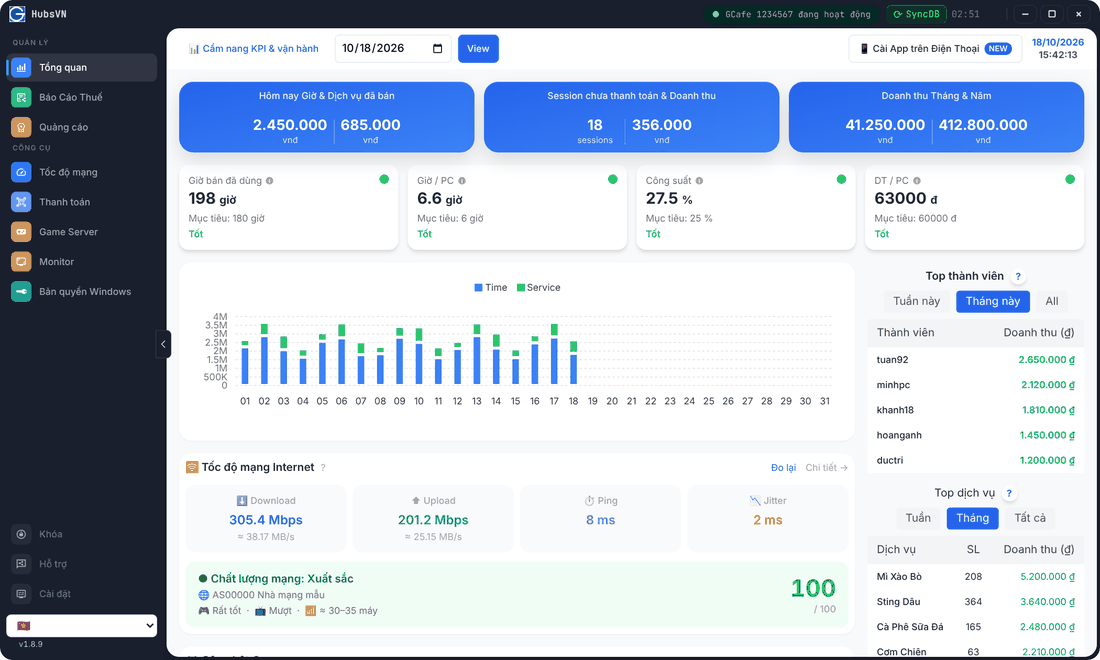
View a specific day
- Pick the date in the date box at the top.
- Click View.
The three revenue cards
Card | Left number | Right number |
|---|---|---|
Hôm nay Giờ & Dịch vụ đã bán (Today’s time & services) | Play-time revenue | Service revenue (food, drinks…) |
Session chưa thanh toán & Doanh thu (Unpaid sessions) | Open sessions | Their amount |
Doanh thu Tháng & Năm (Month & year) | Month revenue | Year revenue |
The four KPI cards
KPI | Meaning | Default target |
|---|---|---|
Giờ bán đã dùng (Hours sold) | Actual play hours in the day. | PC count × 6 hours |
Giờ / PC (Hours per PC) | Average hours each PC was used. | 6 hours |
Công suất (Utilisation) | Share of the 24 hours the PCs were in use. | 25 % |
DT / PC (Revenue per PC) | Average revenue per PC (play time + services). | Derived from your hourly price |
Each card shows a rating against target: Tốt (good), Khá ổn (fair), Trung bình (average) or Không tốt (poor); a green dot means on target, red means below. Click Cẩm nang KPI & vận hành (KPI handbook) to learn how to read each metric.
Chart and top lists
- Bar chart: daily revenue in the month — blue is play time (Time), green is services (Service).
- Top thành viên (Top members): highest-spending members this week / this month / all time.
- Top dịch vụ (Top services): best sellers with quantity and revenue.
💡 Tip: Click Cài App trên Điện Thoại (Install on phone) to view this screen on your phone — see Remote access.