Get to know the Client App
After unlocking, the Client App shows a left menu, a session bar on top, content in the middle and session, quick order and help on the right.
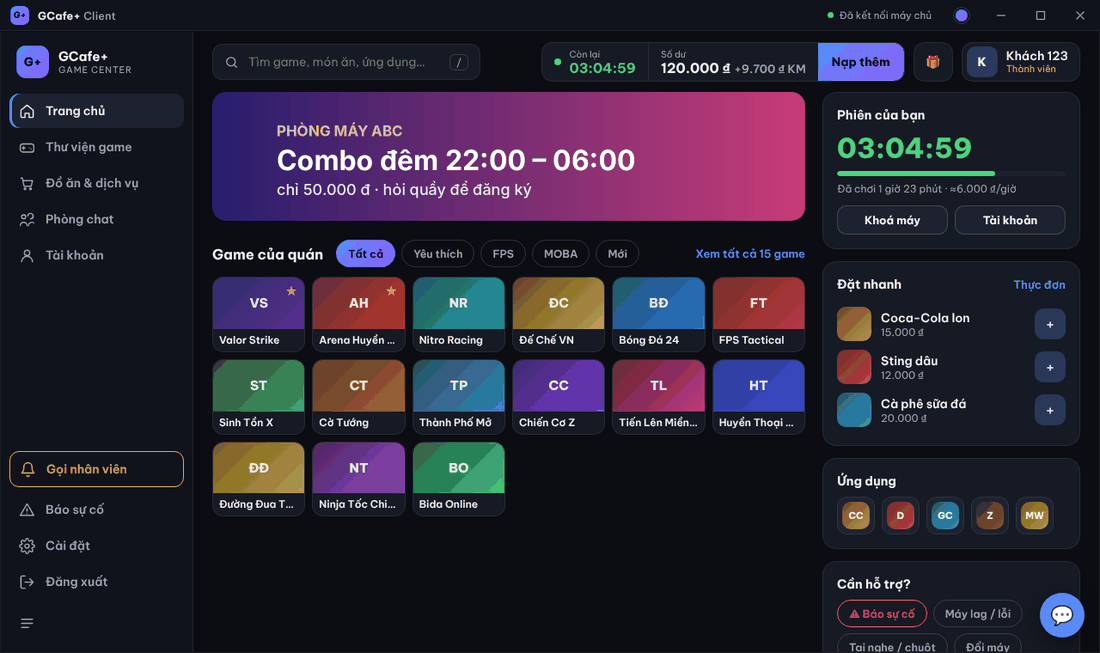
Left menu
Item | Used for |
|---|---|
Trang chủ (Home) | Café banner, games, session, quick order, apps, help. |
Thư viện game (Game library) | All games, filter by genre, sort, change view. |
Đồ ăn & dịch vụ (Food & services) | Order; the cart count shows next to it. |
Phòng chat (Chat rooms) | Chat with the counter and other PCs in the café. |
Tài khoản (Account) | Balance, points, coupon top-up, history, change password, lock PC. |
Gọi nhân viên (Call staff) · Báo sự cố (Report a problem) | Ask the counter to send someone. |
Cài đặt (Settings) · Đăng xuất (Log out) | Language, sound…; end the session. |
Click ☰ at the bottom of the menu to collapse / expand it.
Top bar
- Search box: type a game name (or a food item on the Food page). Press / to jump to it.
- Còn lại · Số dư · Nạp thêm (Top up): see Time left and low-time warnings.
- 🎁 button: Lucky wheel (only when the café enables it).
- Account name and type; click it to open Tài khoản.
Title bar and system tray
- Dot next to Đã kết nối máy chủ (Connected to server): green = connected, yellow / red = connection lost.
- Colored dot: choose the Tông màu giao diện (Color theme, 8 themes).
- ✕ only hides the window to the tray; GCafe+ keeps running. Click the G+ tray icon to reopen; right-click it for Game library, Food & services, Chat with counter, Call staff.
💡 Tip: The 💬 button in the bottom-right opens a small counter chat without leaving the current page. New counter messages pop it open.