

An internet cafe marketing strategy comes down to three things: bring new players in, keep regulars playing longer, and help each player spend a sensible amount per visit. You don't need loud advertising. Most of the results come from setting prices, promotions and member care on purpose, then checking your reports to see what is worth repeating.
This article covers six groups of tasks, in the order you should do them. A summary table at the end helps you pick where to start. If you want the bigger picture of running an internet cafe business, our blog has more.
1. Know when your cafe is full and when it's empty
Good marketing starts with numbers. If your cafe is quiet on Tuesday afternoons but packed on Saturday nights, you need two different approaches, not one promotion for the whole week.
Look at revenue by day, by shift and by machine over at least a few weeks. In GCafe Portal, Business › Reports puts these in one page: revenue by day / week / month / shift, services, revenue by machine, promotions and members. The software also has default KPI targets to compare against: Hours/PC is 6 hours and Utilization is 25% (over 24 hours). These are the software's defaults, so adjust them to match your own cafe.
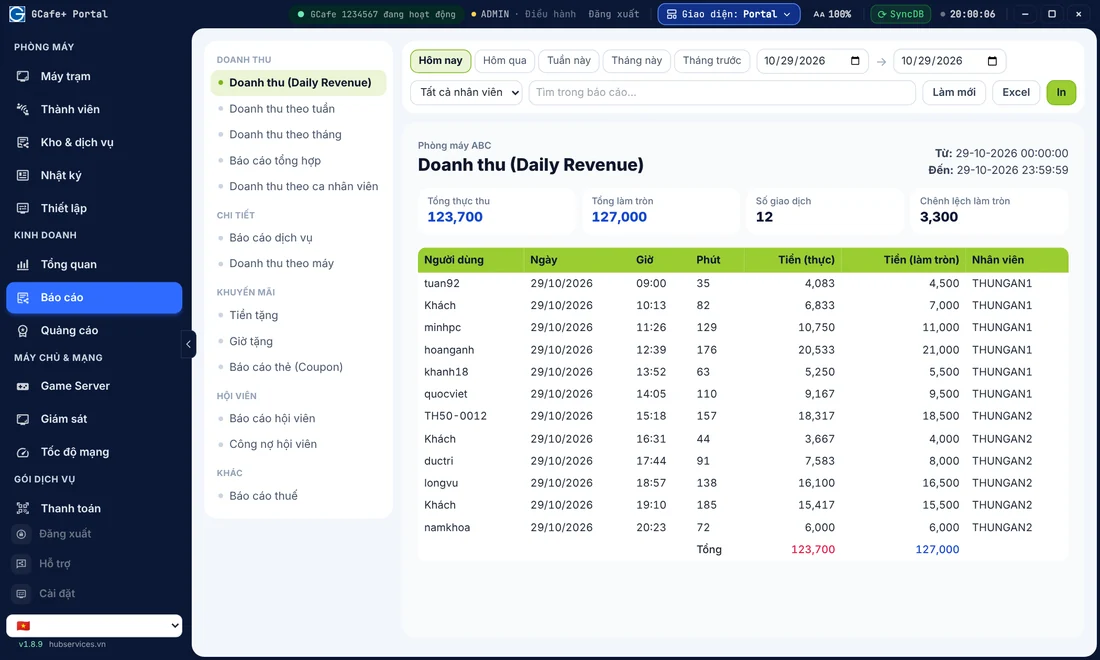
For more on which metrics to watch, read which daily revenue metrics to track.
2. Set prices by time slot and machine zone
Price is the strongest marketing tool an internet cafe has. A slightly lower hourly rate in quiet slots brings in more players without cutting prices at peak time. A VIP zone or high-spec machines can keep a higher price for players who want to play in comfort.
For example, students often visit in the afternoon. A cafe could set a lighter rate for 2 PM–5 PM to fill empty machines. This is only an example of how to think about it. You need to work out the actual price from your own costs and the competition around you.
GCafe Billing calculates play time, hourly charges and service charges by machine group and user group, with money rounding and a minimum price per session. The price test tool lets you check your price list before you apply it. Note: new prices take effect right after you save, so change them when the cafe is quiet to make it easier to check. We explain how to split time slots in internet cafe hourly rates by time slot.
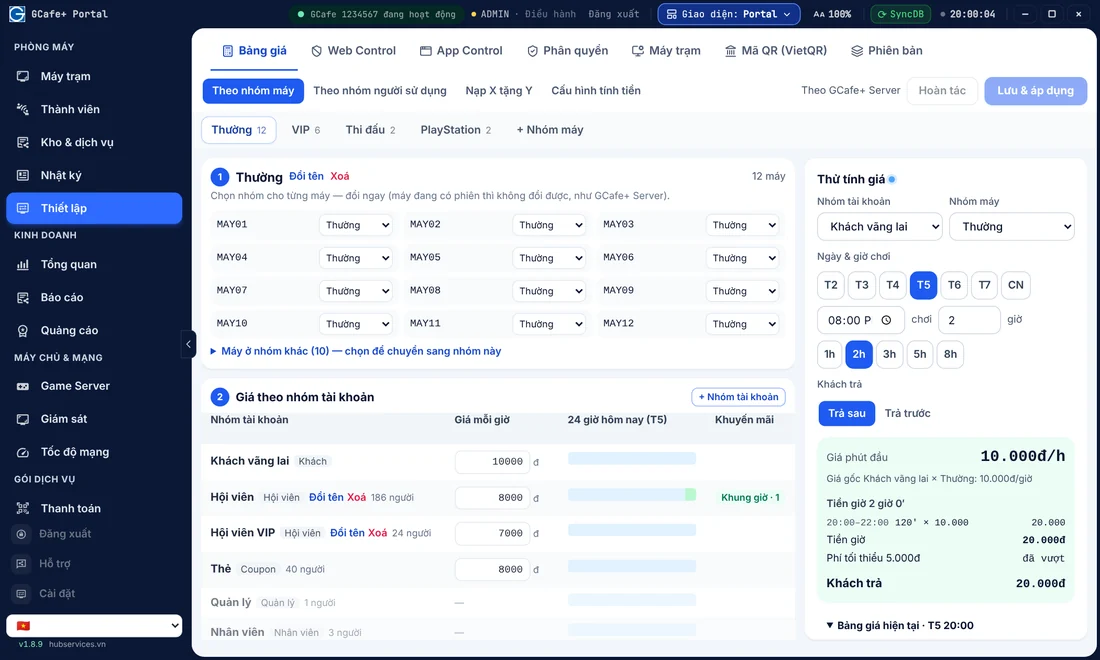
3. Top-up promotions: bring players back
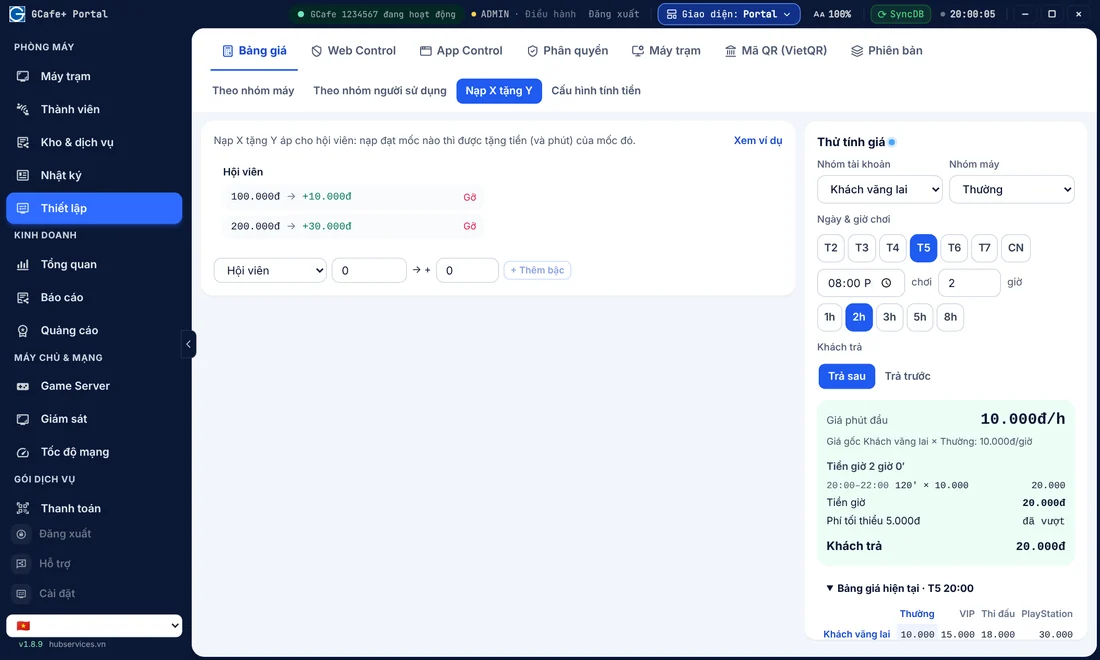
Players who have topped up their account usually come back to your cafe instead of going to another one. A "Top up X, get Y" promotion encourages players to top up more than once. For example, a certain top-up amount earns extra play time or credit. You set the top-up and bonus amounts, so make sure the cafe still makes a profit.
Portal lets you set up Top up X, get Y right in the Price List, with a price test tool alongside. For details on setting bonuses that don't lose money, see how to give free play time without losing money and internet cafe top-up.
A small tip: when a player is about to run out of time, they are most likely to top up. The software warns about remaining time at 30, 15, 10, 6, 4, 3, 2 and 1 minutes. Players with a balance see a Top up button on the workstation.
4. Night combos and coupons for quiet hours
Late nights and early mornings are usually quiet. A night combo bundles play time with food and drinks into one clear-priced package. Players decide easily, and you fill empty machines. See how to price it in how to create an internet cafe night combo.
Use coupons with a clear goal: for new players, for players who haven't visited in a while, or for special occasions. Handing them out to everyone teaches players to expect low prices. In Portal's reports, you can track bonus money, bonus hours and the card (coupon) report to see which campaign is worth running again. Read more in effective internet cafe coupons.
5. Sell more services right at the machine
An internet cafe earns more than hourly fees. Drinks, instant noodles and snacks are the easiest add-on sales, because players are already seated and don't want to leave their match.
- Order at the machine: players open Food & Services on the workstation. Payment options include Deduct from balance, Cash on delivery, Bank transfer, QR code, Pay later at the counter (members) and Add to play session (walk-in guests).
- Service promotions: there are 5 types: Percentage discount, Discount per item, Fixed price, Buy X get Y and Free extra item. The maximum discount staff can set defaults to 50%, which helps stop staff from over-discounting.
- Banners on GameMenu: set up to 5 banners to promote new items or combos. For how to use the 5 slots, see internet cafe workstation banners.
Note: stock, promotions and counter sales only work when Portal handles billing (the recommended mode).
If your cafe also has billiard tables, GCafe Billing / Portal already lets you create a table layout and bill time directly, with no workstation needed. It also supports hardware connections to switch table lights on and off. Read more in billiard management software.
6. Look after members and give players a reason to bring friends
Regulars are your steadiest source of revenue. A few small things work well:
- Member tiers: players who spend more get better perks, which motivates them to "level up". See internet cafe member tiers and internet cafe member management.
- Lucky wheel: it only appears on workstations when your cafe turns it on. Set moderate prizes so it stays fun without costing you profit. See internet cafe lucky wheel.
- Chat and virtual LAN: gamers like to invite each other to play. The chat room has Global Chat, group chat and a cafe channel. Virtual LAN is off by default. Turn it on in Settings › Workstation › Chat Global.
- Cafe branding: use a png/webp logo up to 1 MB. It shows on the newer GCafe+ Client, making your cafe look professional and easy to remember.
- Always-fresh games: players leave fastest when the game they love isn't updated yet. GCafe Update handles automatic game updates. See also when a game gets a major update.
Summary table: what should you do first?
| Task | Goal | Related tool |
|---|---|---|
| Check revenue reports and KPIs | Know your quiet and busy hours | Reports in GCafe Portal |
| Pricing by time slot and machine zone | Fill empty machines, hold price at peak | Price List, price test |
| Top up X, get Y | Players top up more and come back | Price List in Portal |
| Night combos, coupons | Draw players in quiet hours | Promotions, coupon report |
| In-seat orders, service promotions | Raise revenue per player | Stock & Services, GameMenu |
| Members, lucky wheel, chat | Keep regulars | Members, Lucky Wheel, Chat |
If you're just starting, go in this order: check reports, adjust prices, then add promotions. Change only one thing at a time so you know what really works.
How do you know if a campaign worked?
After each promotion, compare revenue in the same time slot before and after. Look at the bonus you gave away and how many players topped up more. If a promotion raises revenue but the bonuses eat all your profit, adjust the bonus amount. Checking the numbers regularly matters more than one good idea.
The tools above are part of GCafe Billing and GCafe Portal, internet cafe management software that is free to use with no limit on the number of machines. Visit the GCafe home page for an overview.
Need advice for your cafe?
Every cafe has a different player base and different busy hours. If you'd like advice on setting up price lists, promotions and reports in GCafe, call our hotline 1900 1232 or leave your phone number on the contact page. The GCafe team will call you back to help.
