
Free
No license fee
GCafeBoot is free, just like Billing, GameMenu and GCafe Portal. See the pricing page for more.
GCafeBoot is the brand name that replaces Diskless / BootRom in GCafe. It is free, has no limit on the number of PCs, and runs alongside the rest of Hubservices' internet cafe management software.
Need advice? Call 1900 1232.
GCafeBoot is GCafe's diskless workstation solution. Many owners used to call it GCafe Diskless or BootRom. The unified brand name is now GCafeBoot.
If you are looking for a bootrom solution for your internet cafe, GCafeBoot is free and has no limit on the number of PCs. GCafe is part of the internet cafe software from Hubservices Joint Stock Company.
GCafeBoot works with the other free products: GCafe+ Billing (with Membership) for billing and member management, GameMenu for your game menu, and GCafe Portal for ads and revenue reports. If you want games to update automatically, add GCafe Update.
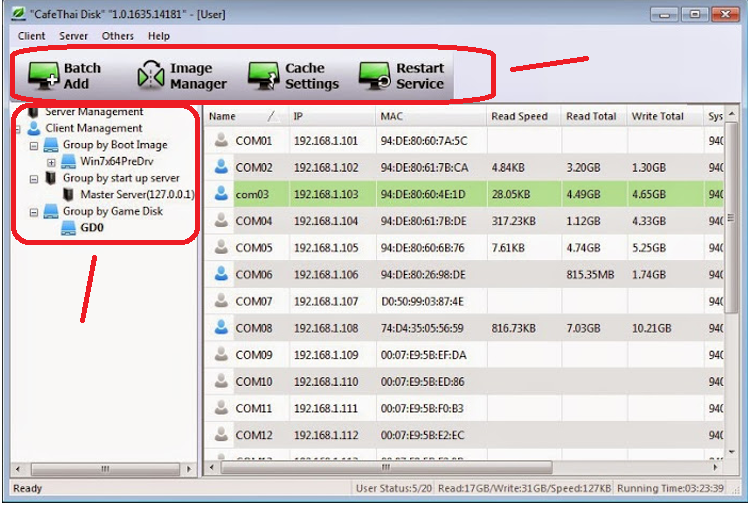
GCafeBoot is free, just like Billing, GameMenu and GCafe Portal. See the pricing page for more.
It works for a 20-PC cafe or a large gaming room. You are never charged by the number of PCs.
The server runs GCafe+ Server and workstations run GCafe+ Client. It works together with Billing, GameMenu and Portal.
See GCafe+ Billing →The two plans differ only in game updates. All other software is free.
| Item | Free plan | With GCafe Update |
|---|---|---|
| GCafeBoot (diskless workstations) | Yes | Yes |
| GCafe+ Billing and Membership | Yes | Yes |
| GameMenu | Yes | Yes |
| GCafe Portal | Yes | Yes |
| Automatic game updates | No | Yes |
| Cost | 0 VND, no limit on the number of PCs | Charged per PC, 6-month plan. Price page. |
The steps below are a general outline. Your GCafe agent or the hotline will walk you through the technical details.
Call 1900 1232 or leave your phone number so a GCafe agent near you can contact you.
Compare your server with the configuration table by cafe size in the requirements section below. Workstation and LAN requirements: [Cần xác nhận].
Install GCafeBoot on your workstations and test a few PCs before rolling it out to the whole cafe. Detailed procedure: The installer is on the Download page.
Bill customers with GCafe+ Billing, turn on GameMenu, and add GCafe Update if you want games to update automatically.
Choose a server configuration based on the number of workstations in your cafe. For specific advice, call 1900 1232.
| Component | Setup for rooms under 30 PCs | Setup for rooms with 30 - 60 PCs | Setup for rooms over 60 PCs |
|---|---|---|---|
| CPU | Intel Core i3 / i5 or older-generation Xeon | Intel Core i5 / Xeon 4-8 cores | Intel Xeon 8-16 cores or more (Dual Xeon) |
| Mainboard | Entry-level server mainboard | Dedicated server mainboard (Intel/Supermicro) | High-end server mainboard, supports dual CPUs |
| RAM | 16 GB | 32 GB | 64 GB or more |
| Network card (NIC) | 2 Gigabit ports (1Gbps) | 2 - 4 Gigabit ports or 1 x 10Gbps port | 4 Gigabit ports or 2 x 10Gbps ports or more |
| SSD 1 (OS & Image) | 1x SSD 120GB - 240GB | 1x SSD 240GB (partitioned for OS and Image) | 1x SSD 250GB for OS + 1x SSD 250GB for Image |
| SSD 2 (Writeback) | 1x SSD 240GB (high write speed) | 2x SSD 240GB (RAID 0 for faster writes) | 2x SSD 480GB or more (NVMe RAID 0 setup) |
| Game drive (Game Disk) | 1x SSD 1TB or 2TB | 1x high-speed 2TB SSD (or NVMe) | 2x 2TB SSD in RAID 0 for faster game loading |
| Operating system | Windows Server 2012 R2 / 2016 / 2019 (64-bit) | Windows Server 2016 / 2019 / 2022 (64-bit) | Windows Server 2019 / 2022 Enterprise (64-bit) |
| Network equipment | 1Gbps switch, CAT5e/CAT6 cable | 1Gbps/10Gbps switch, standard CAT6 cable | 10Gbps core switch, high-quality CAT6A cable |
See also: billing with GCafe+ Billing, GameMenu, GCafe Portal, X2 FIFA IPBoot, about Hubservices.
Tell us how many PCs your cafe has and what you need. You can also call 1900 1232.
Get the installer on the Download page, or check the pricing page to see what is free and what is paid.