HubservicesGCafeInternet cafe software
GCafe+ Billing · Free

Free internet cafe billing software with membership built in.

GCafe+ Billing handles play time, service sales, members and coupons right at your counter. No limit on the number of PCs and no license fee.
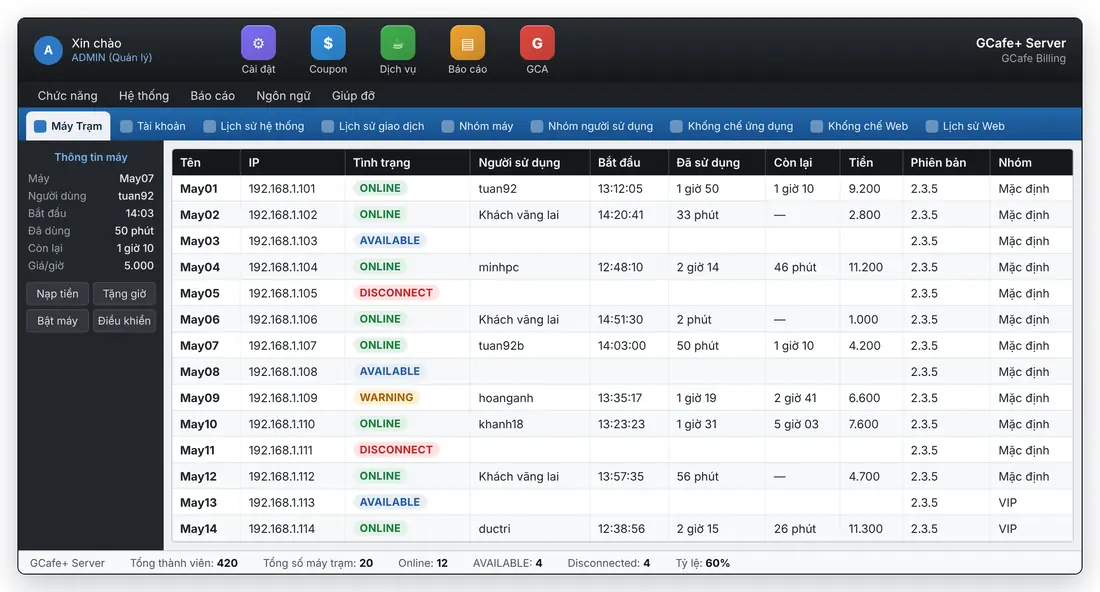
GCafe Billing: list of client PCs showing active players, time and charges

New interface — list view

Two interfaces

The new interface or the familiar Classic one — same data.

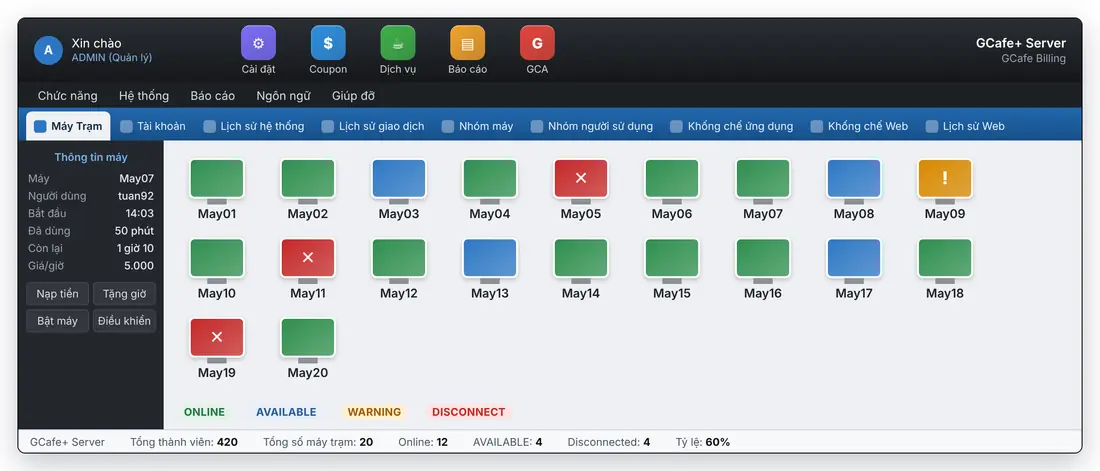
GCafe Billing: list of client PCs showing active players, time and charges
New interface: PC list
GCafe Billing: client PC map shown as icons
New interface: PC map
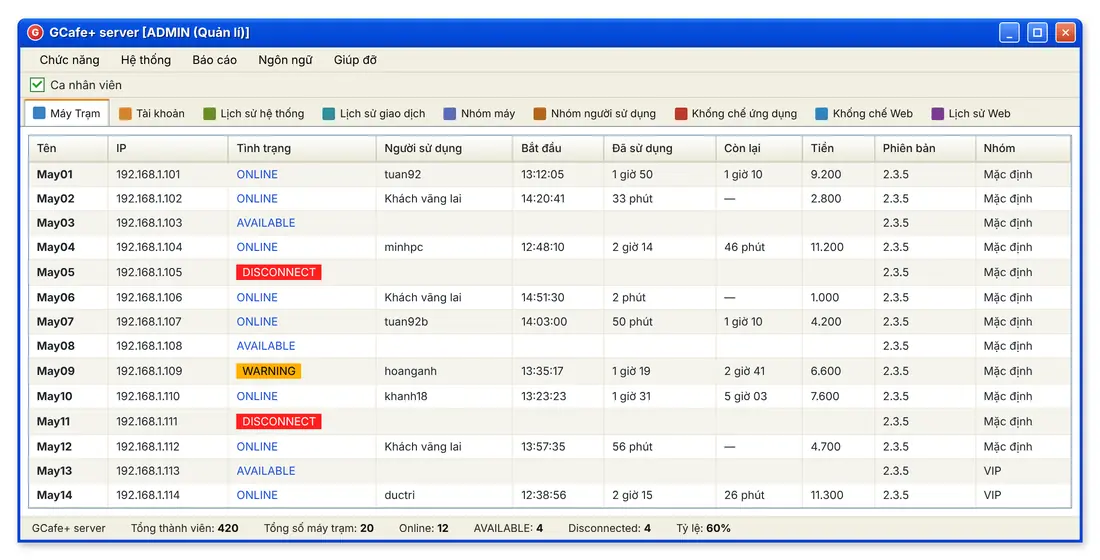
GCafe Billing Classic interface: list of client PCs
Classic interface: PC list
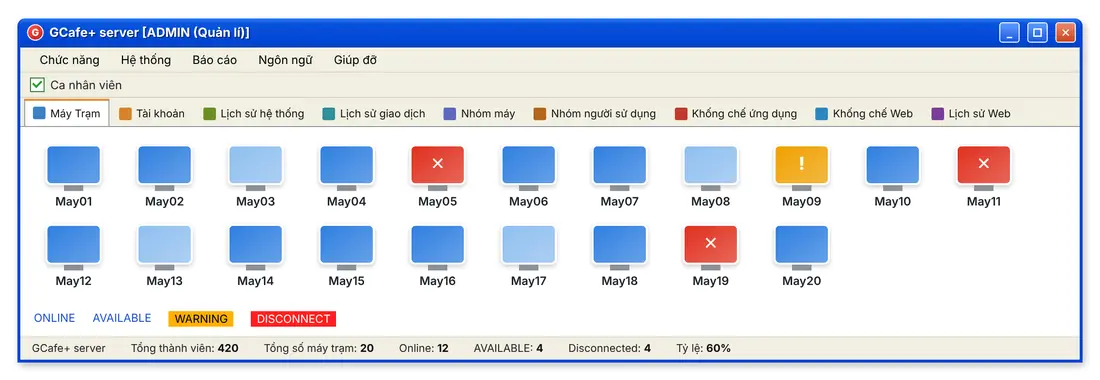
GCafe Billing Classic interface: client PC map
Classic interface: PC map
Flexible pricing

Pricing by PC group, by customer group and by hour of the day.

VIP PCs cost more than standard ones, morning happy hours are cheaper, and late-night players get their own rate. Set it up once and Billing does the math.

A separate rate for each PC group

Each user group has its own rate for every PC group, plus a schedule of the hours they can play on each day of the week.
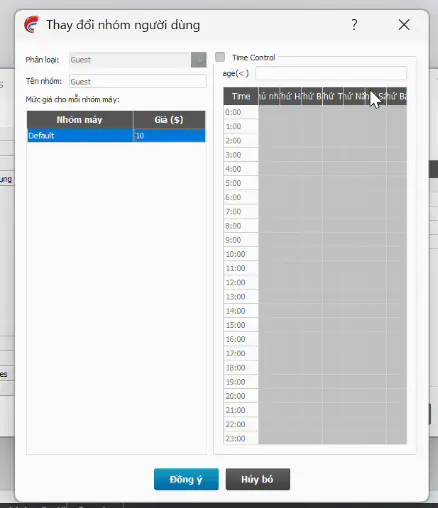
  • Pricing by PC group: VIP, Standard, Tournament…
  • Weekly time schedule: turn each time slot on or off
  • Age limits for customer groups
Settings for pricing by PC group and weekly time schedule
Pricing by PC group and weekly time schedule

Price table: customer group × PC group

One table shows every rate: walk-in guests, members and coupon cards on each PC group. Edit the base price or open advanced settings for any cell.
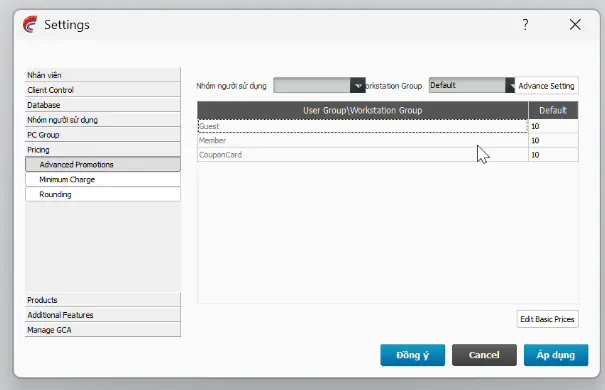
  • Advanced promotions for each price cell
  • Minimum charge and rounding
Price table of user groups by PC groups
Price table: user group × PC group

Time-based price adjustments

Set a separate price for each time slot — happy hour, night rate, weekend. Then test the amount or play time in the settings window before you apply it.
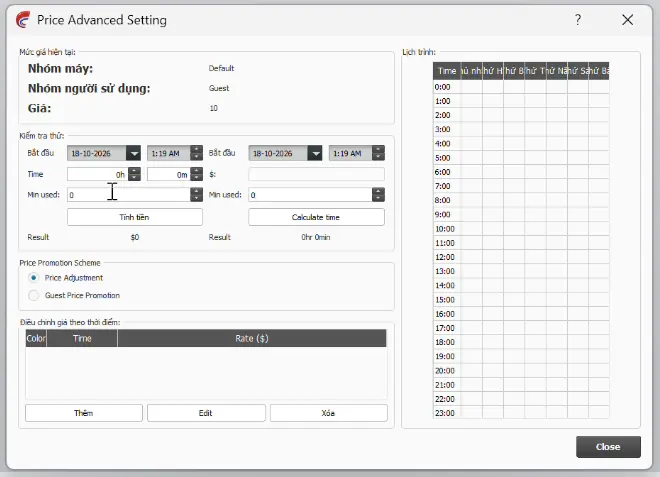
  • Adjust prices or promotions for walk-in guests
  • Schedule by hour and day of the week, one color per slot
  • Built-in calculator to test amounts and time
Adjusting prices by time of day
Adjust prices by time of day
Coupons & combos

Play-time coupons, service coupons, night combos — print them and sell.

Create a coupon template once and print in bulk with passwords. Players can use a coupon to log in to a PC, top up their account or pay for services.

Create a coupon template

Set the value in money or play time, add a bonus, and choose whether the coupon works for login or top-up and which customer groups can use it.
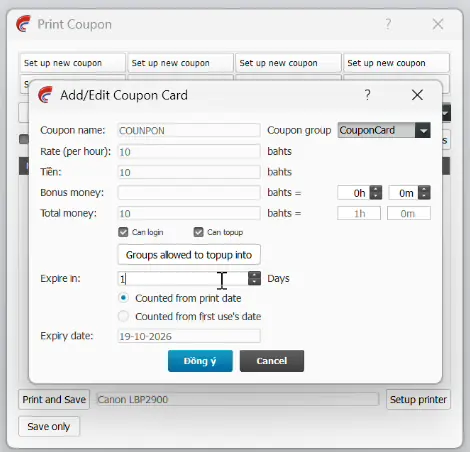
  • Play-time or cash coupons, with optional bonus
  • Valid for play time and counter services
  • Night combo: play-time coupons at their own price for the night slot
  • Expiry counted from the print date or from first use
Creating a coupon template with play time and bonus credit
Create a coupon template

Print and track coupons

Click a template and print the quantity you need. Each coupon has its own code and password, with clear expiry and permissions. The coupon report shows how many were sold and used.
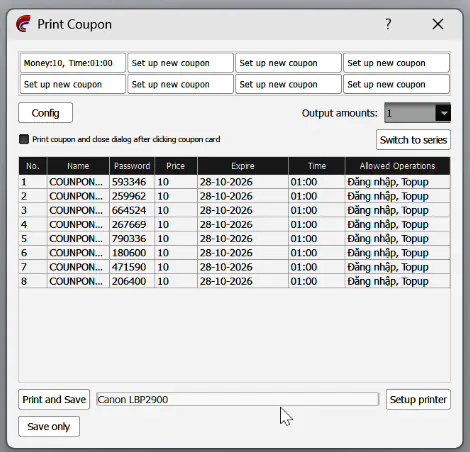
  • Print in bulk or just save
  • Quick-pick coupon templates
  • Reports on coupons sold and used
Printing coupons in bulk with passwords
Print coupons in bulk
Services & stock

Sell drinks and snacks and manage stock right inside Billing.

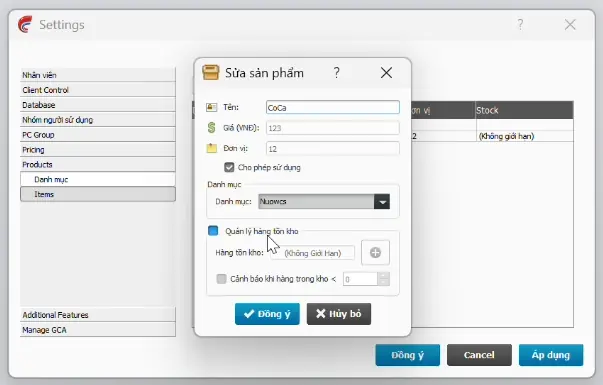
Service catalog and stock levels

Service catalog

Catalog, prices, stock levels and low-stock alerts.
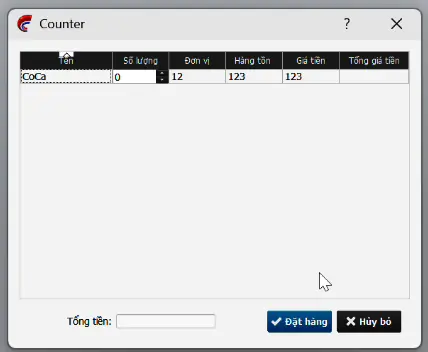
Taking orders at the counter

Counter orders

Take orders at the counter and see what's in stock right away.

Membership · built into Billing

Manage internet cafe members and top-up promotions.

Separate top-up and bonus accounts

Money players top up and promotional credit sit in two separate accounts, so end-of-day reconciliation is easy.

Top up X, get Y

Create top-up promotions that add a bonus, so players top up more and come back often.

User groups

Members, walk-in guests, staff, managers, coupon cards — each group gets its own rate.

Clean up old accounts

Filter members who haven't played in a long time, or expired coupons, then delete them or reset their balance to 0.
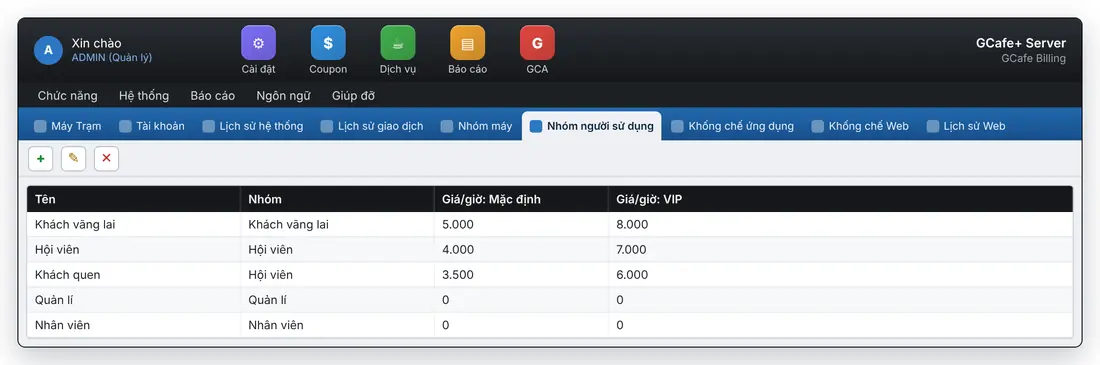
User groups and pricing by group
Reports & control

Know your revenue by day, by PC and by item.

Complete reports

Revenue, services, client PCs, coupons, members, outstanding balances — view them by day, by shift or by staff member.
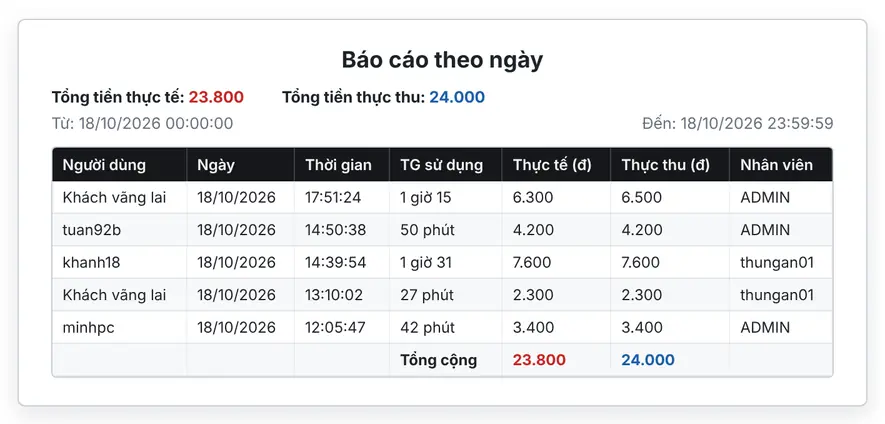
Daily revenue report

Time-based billing

Automatically calculates play time, rounding and the minimum charge for walk-in guests.

Website and app blocking

Block unwanted websites and apps on client PCs and review browsing history.

Client PC control

Shut down, restart and turn on PCs over the network, and schedule shutdowns, all from the counter.

Automatic backup

Schedule data backups by hour, day or week. You can compress them with a password.

Staff shifts

One account per staff member, with reports by cashier.

Email reports

Send regular revenue reports to the owner's email.

Truly free, with no PC limit.

Billing, Membership, GCafeBoot, GameMenu and GCafe Portal are all free. You only pay if you want automatic game updates with GCafe Update.

Questions about GCafe+ Billing

See also: game updates with GCafe Update, diskless client PCs with GCafeBoot, revenue reports on GCafe Portal.

Is GCafe+ Billing free?
Yes. Billing and Membership are free with no limit on the number of PCs. You only pay if you add GCafe Update for automatic game updates.
Is there a Classic interface like the old version?
Yes. Choose the new interface or the familiar Classic one. The data and features are the same.
Can I set a night price different from the day price?
Yes. Set prices by weekly time slot for each PC group, or sell night combo coupons.
Can coupons be used for services?
Yes. A coupon can hold play time or money, and works for both play time and counter services.
What is the program called on the PC?
The server (billing PC) runs GCafe+ Server, and client PCs run GCafe+ Client.
Who installs GCafe+ Billing for my internet cafe?
The GCafe agent in your province or the hotline 1900 1232 can install it for free.
Support
Sign up for GCafe

Leave your phone number and a specialist or the nearest reseller will call you back.

I need

In a hurry? Call 1900 1232 · Zalo