
Nights are when many internet cafes have empty seats. Empty PCs still cost you electricity, staff and internet. Knowing how to build an internet cafe night combo helps you fill those seats, without setting the price so low that the room is full and you still lose money.
This article goes in order: why run a combo, choosing a time slot, choosing your players, working out break-even pricing, setting it up in software, then promoting and tracking it. The numbers are only illustrative examples. Replace them with your own.
What does a night combo do for your internet cafe?
A night combo is a package that covers a full night-time session at one bundled price. The player pays once, plays without interruption, and can get food or a drink included. For you as the owner, the main benefits are:
Fill empty PCs during quiet hours instead of letting them sit idle.
Keep regulars: players know what they will pay, so they come back more easily.
Grow side revenue when the combo includes a drink, instant noodles or a snack.
The risk is that players who already play at night at the standard rate switch to the cheaper combo. So work out the numbers before you announce it. The sections below show how.
Step 1: Choose the combo time slot
Don't apply a combo to the whole night at random. Look at your own data:
Check which hours had the most empty PCs over the last 2–4 weeks.
Find when players start to thin out, usually after the after-school and after-work crowd has gone home.
Pick a slot with clear edges, for example 22:00 to 06:00, so players can remember it.
If you use GCafe Billing internet cafe billing software or GCafe Portal, you can review the night-time occupancy rate in the Overview section to pick the right slot. You can also read our article on internet cafe hourly rates by time slot to split off-peak hours sensibly.
A quick tip: start with just one time slot. Once it runs well, add a second.
Step 2: Choose your target players
Who the combo targets changes how you set the price and how you word the offer. Some groups common in internet cafes:
Group gamers: they usually come with friends, stay long, and like seats close together.
Late-night casual and ranked players: they sit for many hours in a row.
Regulars and members: easy to keep with a dedicated offer.
Pick one main group. If most of your players are members, you can attach the night rate to each member account group. GCafe Billing includes Membership for free. Read more on the internet cafe membership management page.
Step 3: Work out the break-even price (illustrative example)
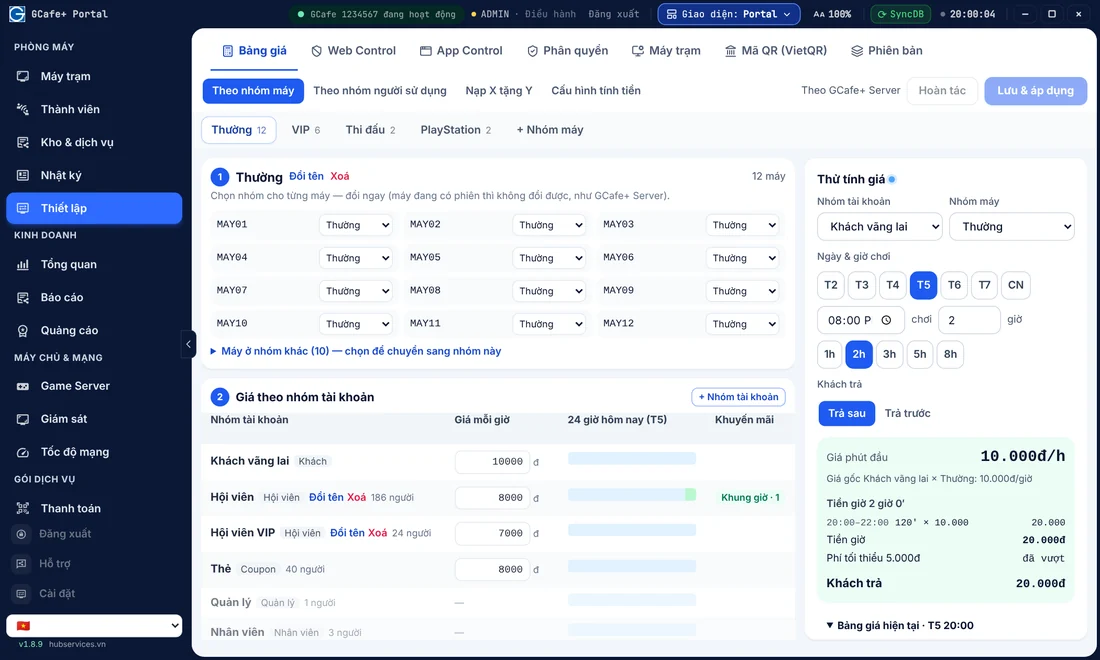
When you create an internet cafe night combo, this is the most important step. The rule: the combo price must be higher than the cost per PC per hour multiplied by the number of hours, plus the cost of whatever is included, plus the minimum profit you want.
Here is an assumed example (not real figures from GCafe or any cafe):
Combo window: 8 hours.
Average cost per PC per hour (electricity, staff, internet, PC wear spread evenly): 3,000 VND.
Included item: 1 bottle of water, cost price 5,000 VND.
Standard hourly rate: 8,000 VND/hour.
Item | How to calculate | Example figure |
|---|---|---|
Cost of 8 hours of play | 3,000 VND × 8 hours | 24,000 VND |
Cost of included water | Purchase price | 5,000 VND |
Combo break-even price | 24,000 VND + 5,000 VND | 29,000 VND |
Planned combo price | Break-even + target profit | 35,000 VND |
Profit per player | 35,000 VND − 29,000 VND | 6,000 VND |
Standard price for the same 8 hours | 8,000 VND × 8 hours | 64,000 VND |
In the table, the combo is much cheaper than the standard price, so players see good value. You still profit if that PC would have been empty anyway. But if a player who would have paid 64,000 VND at the standard rate switches to the combo, you lose the difference. So:
Limit the combo to hours that are truly quiet.
Require a minimum number of hours, or apply it to only some PCs.
Don't set the combo so low that it sits right at break-even.
Fill in your real numbers: cost per PC per hour, cost of the included items, and the share of players who switch from the standard rate to the combo. Getting just these 3 numbers right is enough to set a safe price.
Step 4: Set clear rules for the combo
Combos cause arguments when the rules are vague. Decide these in advance:
Start and end time of the combo.
What happens when time runs out: bill at the standard rate or stop the PC.
Whether players can switch PCs or take a break during the session.
The included item: where and when the player collects it.
Keep it short, post it at the counter, and have staff explain it the same way. Players who understand the rules from the start complain less.
Set up a night combo in GCafe Portal and GCafe Billing
The GCafe internet cafe software suite combines GCafe Billing (the server runs GCafe+ Server, the workstations run GCafe+ Client, with a new interface and a Classic interface) with GCafe Portal. Both are completely free, with no limit on the number of PCs.
In GCafe Portal, you can build a night combo from 3 built-in features, following the night combo setup guide:
Set a night hourly rate: On the price row for a player group, click Add time slot, enter the night window (for example 22:00–06:00) and a lower hourly price.
Give a free drink or snack with night orders: Go to Inventory & Services › Promotions to create a happy-hour promotion or a free-drink offer for players who order from their workstation. Note: the "free extra item" type only runs when the cafe uses Portal for full billing. See the article on promotions for food and drinks for details.
Create night combo cards (optional): Create card codes preloaded with credit or play minutes, to sell as a full package to night players (for example a "50K night card").
If you also want to add discount codes, read effective internet cafe coupons (Vietnamese). When you need help with setup, call the hotline 1900 1232 (remote installation over the internet is currently free for customers).
Promote the combo in your cafe
A great combo is worth nothing if players don't know about it. A few simple ways:
Price board at the counter: show the combo name, hours and price clearly.
Workstation banners: GCafe Portal supports banners on GameMenu and workstations, up to 5 slots plus a wallpaper. Use one slot to announce the "Night combo". See more tips in the article on internet cafe workstation banners.
Staff reminders when players top up in the early evening.
A combo also works best with a game library that is always ready. Games that are updated on time help players stay longer at night. You can look at GCafe Update automatic game update software. It is a paid product on a 6-month plan priced at 900,000 VND / 6 months / 30 workstations. See details on the pricing page.
Track revenue and adjust the combo
Run the combo for 2–4 weeks, then compare. In GCafe Portal, you can check results in the Service Report (discounts given, free items) and in Overview (night-time occupancy rate):
Number of players using the combo each night.
Revenue in that time slot compared with before the combo.
Share of existing players who moved from the standard rate to the combo.
Actual gross profit compared with the break-even price you calculated.
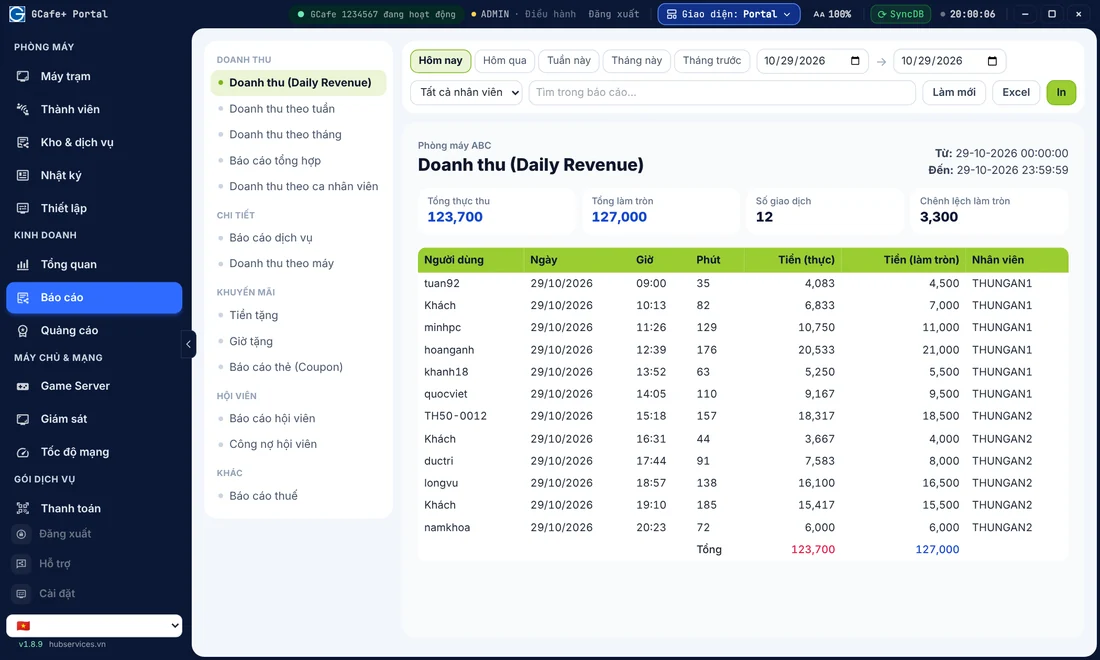
Besides daily revenue tracking, GCafe Portal can also export the S1a-HKD revenue ledger under Circular 152/2025/TT-BTC for household businesses. See the guide on exporting the S1a-HKD revenue ledger from GCafe Portal (Vietnamese).
If the combo loses money, don't drop it right away. Try raising the price a little, shortening the time slot, or trimming what's included. Change only one thing at a time so you know which change worked.
Summary and next steps
In short, a profitable internet cafe night combo follows this order: choose a quiet time slot, choose your player group, work out the break-even price, set clear rules, then track real numbers in your software. The tools run it for you, but the numbers must come from your own cafe.
Want advice on setting up a night combo in GCafe Billing and GCafe Portal? Call the hotline 1900 1232 or leave your phone number in the contact section on the pricing page. You can also download GCafe and start using it for free today.