

An internet cafe night combo is an all-in-one playtime package sold at a fixed, discounted price during late-night hours (usually from 10 PM to 6 or 7 AM the next morning). Instead of charging by the hour, you collect one flat fee, or deduct it straight from the member's account, so players can stay all night. When the price is right and you bundle in food and drinks, a night combo fills empty PCs, helps cover rent, and noticeably lifts your service revenue.
But many owners set night packages by gut feeling. The room looks full, yet at the end of the month there is still no profit, because air-conditioning power and night-shift staff cost too much. This article shows you how to work out your costs, choose the right types of night package, and manage operations so you attract players and still protect your margin.
Why should an internet cafe offer a night combo, and why calculate it carefully?
After 10 PM, the number of walk-in players usually drops sharply. Fixed costs such as rent, equipment depreciation, and internet lines still have to be paid every day. Opening a night package brings 3 clear benefits:
- Make full use of your capacity: Turn idle PCs into cash income every night.
- Boost food and drink (F&B) sales: Players who stay up all night often want instant noodles, energy drinks, and coffee. Night-shift profit from the kitchen and drink fridge is often better than the playtime itself.
- Keep loyal customers: Gamers who like to climb ranked ladders at night usually come in groups. Once they get used to a night package at your cafe, they tend to top up and play there during the day too.
Still, the night shift has a downside. Electricity for the PCs, cooling costs, and night-staff wages (often higher than day shift) are direct expenses. If you cut the night package price too low just to compete, the money you collect won't cover power and hardware wear.
3 steps to price an internet cafe night combo without losing money
To set a sensible price for a night combo, don't look at the cafe next door and knock a few thousand off. Use the real numbers from your own room, in these 3 steps:
Step 1: Calculate the break-even point of one night shift
First, estimate the extra operating costs of opening from 10 PM to 6 AM:
- Electricity for each workstation and the air conditioner: A PC with a monitor running 8 hours straight uses a fixed amount of power, on top of the air conditioners and exhaust fans. See how to save electricity in your internet cafe to reduce this cost.
- Staffing costs: Wages for the attendant or guard on night duty.
Divide the total extra night-shift cost by the average number of players you expect to stay overnight. That gives you the minimum price floor for each night package, so you don't have to cover power and labor out of your own pocket.
Step 2: Price by machine zone
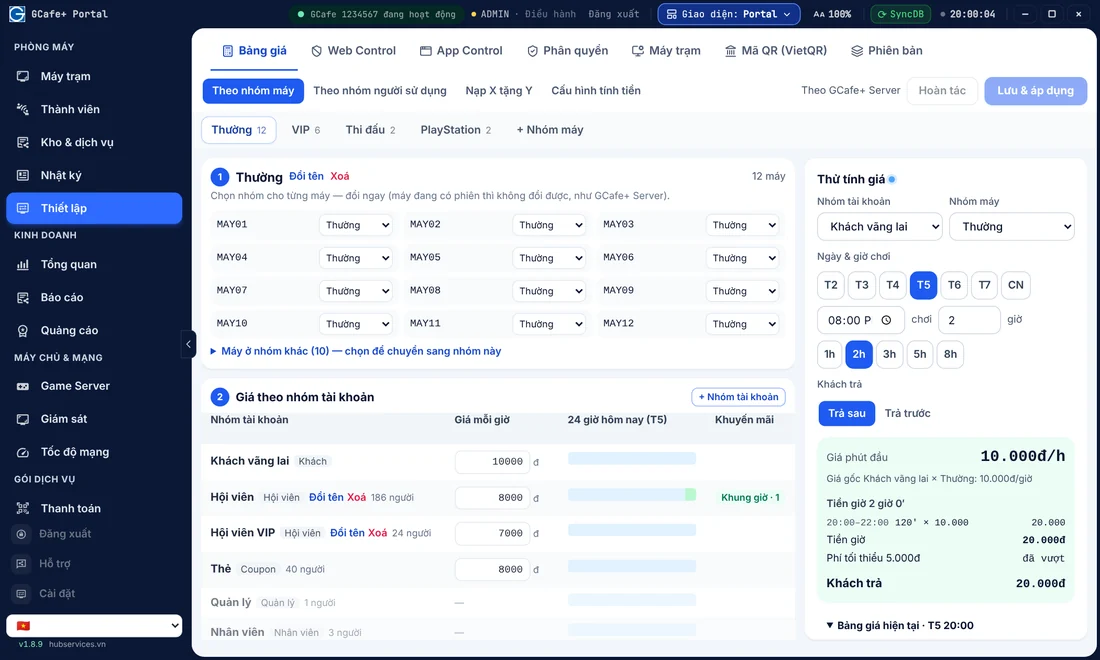
A gaming room is usually split into several areas: standard PCs, VIP PCs, competitive PCs (FPS/Esports), or couple rooms. Each zone has different hardware and power use, so night combo prices should be set separately.
A common rule many owners follow: the night combo price (8 hours) is roughly equal to 4–5 hours of regular hourly play on the same PCs at standard rates. Players can see right away that they save almost half if they stay all night, while you still collect about as much as a busy afternoon.
You can set a separate rate for each zone in your internet cafe billing software, so the system automatically applies the right rate when a player logs in.
Step 3: Choose sensible start and end times
The most common night package window is 10:00 PM to 6:00 AM or 11:00 PM to 7:00 AM. Keep two timing points in mind:
- Don't start the night package too early (for example at 8 PM or 9 PM): Roughly 8–10 PM is still prime time. If the night combo starts at 9 PM, players on regular rates will switch to it, and you lose peak-hour revenue.
- End the night package to match the morning shift handover: Ending at 6 or 7 AM lets staff clean up, air out the room, and do the start-of-day internet cafe maintenance before the morning crowd arrives.
4 night combo templates that are easy to run and popular with players
Instead of selling one plain playtime package, you can mix in services to create more appealing choices. Here is a comparison of 4 night combos used in real gaming rooms in Vietnam:
| Suggested package | What's included | Target customers | Owner's goal |
|---|---|---|---|
| Basic Night Combo | Playtime only, 10 PM – 6 AM | Students and players who want to spend as little as possible | Fill empty PCs in the standard zone |
| Energy Night Combo | All-night playtime + 1 can of soda / energy drink / coffee | Ranked grinders who need to stay alert all night | Encourage sales of high-margin drinks |
| Warrior Combo (Full Belly) | All-night playtime + 1 bowl of noodles with egg/sausage + 1 drink | Players who arrive late in the evening and haven't had a late meal | Maximize kitchen revenue and raise the bill value per customer |
| Squad Night Combo (Buy 5, Pay for 4) | Buy 5 night packages at once for a discount or a free large pitcher of drinks | Friends who play MOBA or FPS games in 5-person teams | Bring the whole squad in and build a lively night-shift atmosphere |
When you bundle food and drinks with playtime, players feel they get a cheaper all-in-one deal in a single purchase. For you, selling a bowl of noodles or a can of soda alongside raises the real profit earned per seat.
How to set up and manage night combos to prevent losses
The night shift is when owners are usually not at the room in person. If staff take cash outside the system without entering it, or open a PC for an acquaintance who wants to sleep there, you lose both playtime and product revenue.
Configure automatic pricing in your billing software
For tight control, every night package purchase should go through the internet cafe member management feature of GCafe Billing (GCafe+ Server on the billing server and GCafe+ Client on the workstations). Instead of letting the cashier calculate by hand, you set the pricing rules in the software in advance.
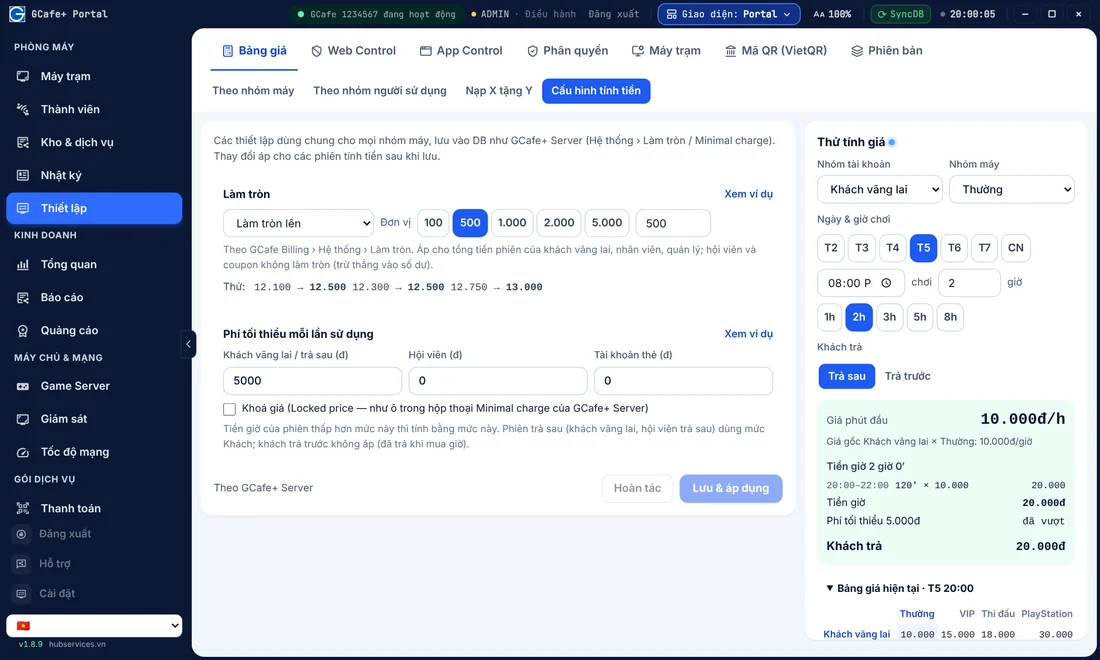
When a player tops up their account, they can choose a night package right on the workstation screen or ask the cashier to activate it in the system. The money is deducted directly from the member account. When the night package ends (for example at exactly 6:00 AM), the system switches to regular hourly rates automatically, or locks the screen if the account balance runs out. This helps you avoid running past closing hours or arguing with players early in the morning.
Monitor night-shift revenue remotely
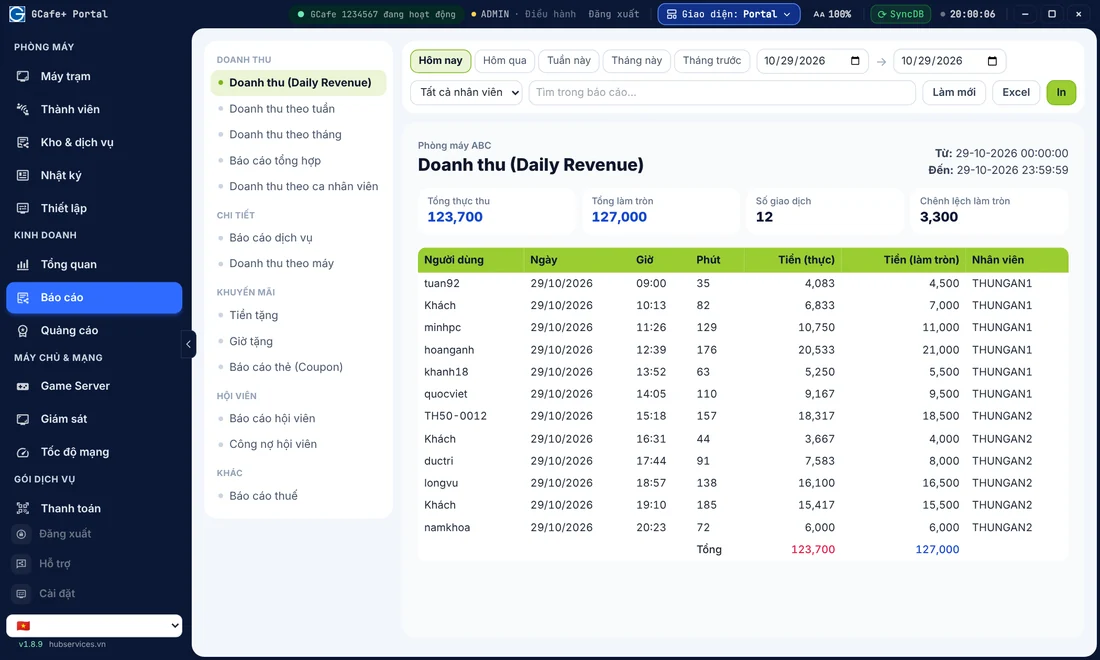
Besides pricing setup, your internet cafe shift handover at 6 or 7 AM should reconcile the number of night packages sold in the software against the instant noodles and soft drinks taken out of stock.
If you use GCafe Portal as your internet cafe revenue management software, you can check night-shift revenue reports on your phone at any time without staying up late at the cafe. Playtime income and member top-ups are synced clearly.
Promotion tips so players know about your night combo
Once you have designed an attractive night package, the next step is making sure players already in your cafe know about it and sign up:
- Use the workstation screen: Don't spend much on paper banners for the wall. In a dark room, players rarely look around. Use the workstation screen advertising feature in GCafe Portal (up to 5 banner slots plus a workstation wallpaper) to show a message like: "Tonight at 10 PM: Night combo + 1 noodles + 1 drink at a great price – sign up at the counter!"
- Announce through the internal chat room: Around 9:30 PM, the cashier can send a gentle reminder to members at their PCs that the night package is about to open, so they can top up in time.
- Offer a reward for next time: For regular night players, you can combine this with an internet cafe coupon program or lucky wheel spins to encourage them to return on weeknights (Monday to Thursday), which are quieter than weekends.
Operating notes for a safe and efficient night shift
Running a night shift has its own demands around gamer health and security. Ask your night staff to follow these rules:
- Follow security and local regulations: Close the shutter (if you have one) according to local curfew rules, keep order in the parking area, and keep a close watch on bike locks at night.
- Prepare kitchen supplies before 10 PM: Before handover, the evening shift should check there are enough noodles, eggs, and sausages, and keep soft drinks chilled in the fridge. The night shift often has only one person on duty, and being prepared lets them serve quickly without leaving the cashier desk for long.
- Adjust the air conditioning in the early morning: Between about 3 and 5 AM, the outside temperature drops and players who stayed up late can feel cold. Staff should raise the air conditioner temperature by 1–2°C to keep players comfortable and save power.
- Schedule game updates sensibly: Many big games release patches in the early morning. Using automatic game update software for internet cafes such as GCafe Update together with diskless workstations on GCafe Boot lets the server download updates in the background without lagging the connection of players climbing the ladder at night.
Run your gaming room better with the GCafe ecosystem
A successful night combo isn't about slashing prices as deep as possible. It's about flexibly combining playtime, food and drinks, and automated management so no revenue slips away.
With 15+ years alongside 50,000+ gaming rooms, GCafe's free internet cafe software suite (GCafe Billing, GCafe Boot, GCafe Portal, and GameMenu — free, with no limit on the number of PCs) helps you set hourly rates by time slot, create night packages, manage members, and track revenue remotely from your phone.
If you need advice on setting up playtime packages or upgrading the management system for your room, call the hotline 1900 1232 or leave your phone number on the Contact GCafe section so our technical team, with agents in all 34 provinces and cities, can support you as quickly as possible!
